
turbotax icon
cancel
Showing results for 
Search instead for 
Did you mean: 
Close icon
Do you have a TurboTax Online account?

We'll help you get started or pick up where you left off.

Form 8829 Calculation error on Line 42

Hi all,

In TT Home & Business edition, the form 8829 has an error when calculating the allowable depreciation - when multiplying ling 40 by line 41 the result on line 42 the form is wrong - see below

And on another sch C - the form calculates the depreciation % wrong.

Is there a fix in the works for this issue?
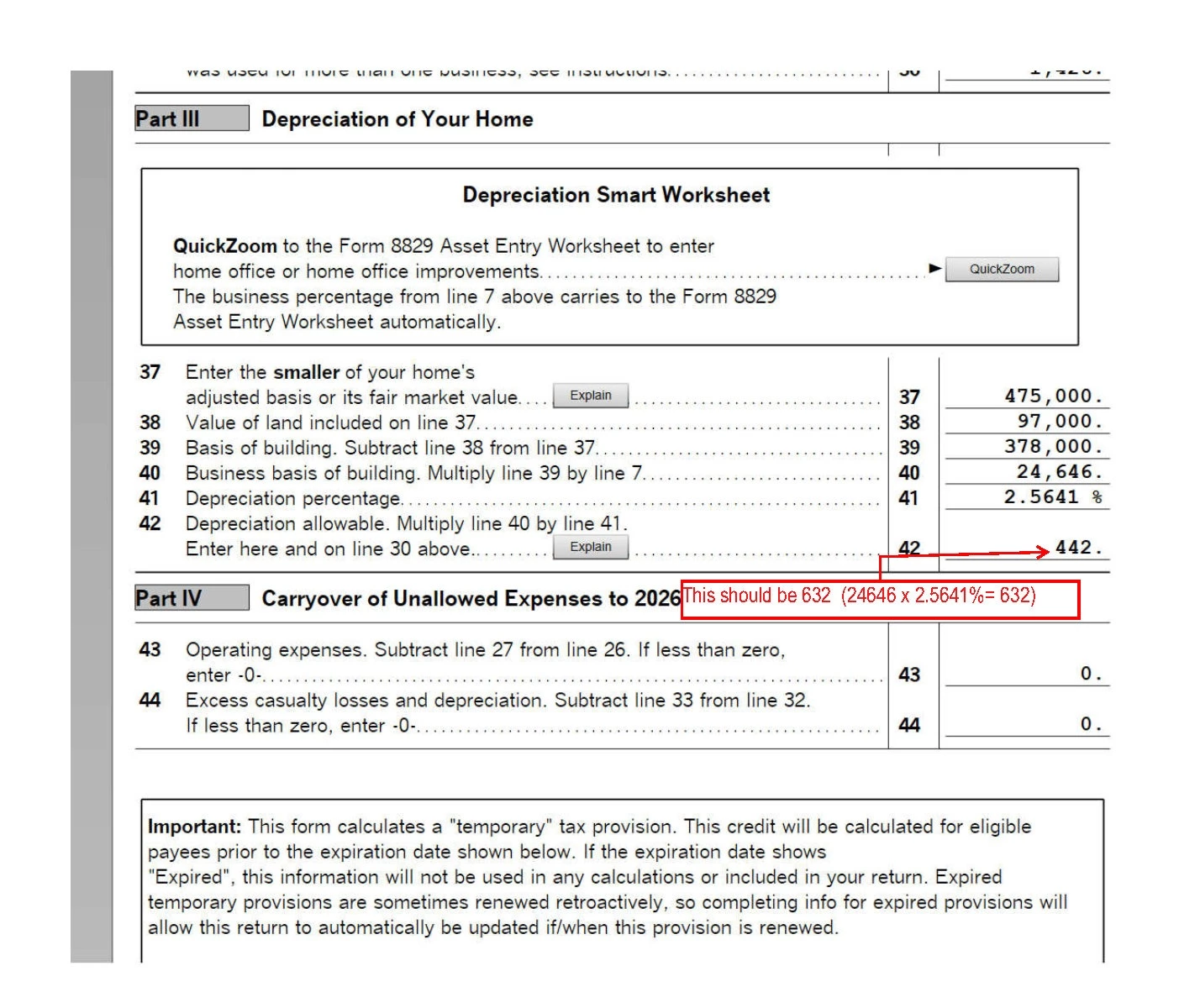
88298829

Thanks

Alina

x
Do you have an Intuit account?

Do you have an Intuit account?

You'll need to sign in or create an account to connect with an expert.

3 Replies
rjs
Level 15
Level 15

Form 8829 Calculation error on Line 42

On Form 8829, line 42 is not necessarily line 40 multiplied by line 41. On the actual form, line 42 says "see instructions." TurboTax doesn't show that in forms mode, but if you preview the printed form you will see it. Look at the instructions for line 42 on page 6 of the IRS Instructions for Form 8829. You will see that if there were any additions or improvements to the home before 2025 the depreciation is calculated differently. Also note the following from the help for line 42 ("About Line 42") in forms mode.


"Note: the depreciation percentage on line 41 will always match the percentages shown in the IRS instructions (except for minor rounding differences). However, since the program does not use the tables to compute depreciation, the depreciation allowable on line 42 may not be line 40 multiplied by line 41. Instead, the allowable depreciation shown on line 42 is the amount from line 10 of the Form 8829 Asset Entry Worksheet (plus line 8i, if applicable). Generally, there should only be a difference if the business use percentage of the home has varied over the recovery period."


You also said that you think the depreciation percentage is wrong "on another Schedule C." Do you mean the depreciation percentage on line 41 of another Form 8829? If that's what you are referring to, look at the instructions for line 41 in the IRS instructions and see if you still think it's wrong.


Form 8829 Calculation error on Line 42

Hi rjs,

Thanks for your reply. 

I'm trying to allocate the income and expenses between my wife and I as a QJV (50/50). In prior years I used part of my home as a home office and filed a sch C (only me). This year we use the same area of the home as a home office split between us 50/50. Based on the instructions you linked it will make sense to have a different allowable amount since for my wife the 8829 "date placed in service" would be Jan 1,2025 so % from instruction is 2.461%.

But for my 8829 should be 2.564% since there is no change from previous year and the "date place in service" is unchanged (2015) - the depreciation basis is correctly reduced to half from the previous year since the other half was used by my wife.

But TT will calculate it like I have shown in the previous post. The workaround I found is if I check line 43 Asset Entry "Use IRS Tables for MACRS property" it will show the correct amount on 8829 line 42 based on the 2.564%. Is this the right way to do it? Will this create issues in the future? (That box is greyed out of wife's Asset Entry.)

Thanks.


Form 8829 Calculation error on Line 42


@alira72 wrote:

In prior years I used part of my home as a home office and filed a sch C (only me). This year we use the same area of the home as a home office split between us 50/50.


The workaround I found is if I check line 43 Asset Entry "Use IRS Tables for MACRS property" it will show the correct amount on 8829 line 42 based on the 2.564%. Is this the right way to do it?


If you change your "prior depreciation" to 50% of what it was, I suspect it will calculate what you are expecting it to do.


Yes, checking the "Use IRS Tables" is fine.  That changes the way TurboTax usually calculates depreciation (which is partially dependent on the "prior depreciation") and will not give you an problems in the future.

Unlock tailored help options in your account.

message box icon

Get more help

Ask questions and learn more about your taxes and finances.

Post your Question




