

- Mark as New
- Bookmark
- Subscribe
- Subscribe to RSS Feed
- Permalink
- Report Inappropriate Content
Deductions & credits
You have what is called in tax terms a 'claim of right' situation. Claim your social security disability income as instructed by our Tax Expert previously.
Since you already filed your 2022 income tax return, Be sure to read all the instructions carefully, before you begin, so that TurboTax knows the original numbers and the changed numbers for your amendment.
- How to amend (change or correct) a return already filed?
- What is the deadline for filing an amended return?
The information on your options and how to make the entry is provided here and it is called Claim of Right.
Claim of Right
- If you had to repay an amount that you included in your income in an earlier year, because at the time you thought you had an unrestricted right to it, you may be able to reduce your income by the amount repaid in the current tax year the amount you repaid is more than $3,000, or you may take a credit against your tax for the year repaid, whichever results in the least tax.
The answer is based on the assumption that the payment is received in 2021, and some of the repayment of the overpayment did occur in a later tax year (2022). A W-2C isn't an action that would normally occur in your situation.
- 2021: The W-2 should be correct. The payment and part of the repayment occurred in the same tax year. The W-2 should have been reduced by the amount of the repayment they withheld from you in the same tax year.
- 2022: The repayment of $3,499 was repaid in a later tax year and should have been included in your gross wage on the W-2 for 2022.
- This is known as a 'Claim of Right' and can be used to reduce your taxable income as a deduction or a credit to reduce your overall tax liability on your 2022 tax return because it is over $3,000.
Credit: If you choose to use the credit instead of the income reduction, then you would have to calculate that manually.
- The tax return would have to be completed in the TurboTax CD/Download version if the credit is used. For assistance with this, see:
- Figure your tax for 2021 without deducting the repaid amount you received in 2022.
- Refigure your tax from the earlier year (the year you originally reported the income) without including in income the amount you repaid in 2022.
- Subtract the tax in (2) from the tax shown on your return for the earlier year. This is the credit.
- Subtract the answer in (3) from the tax for 2022 figured without the deduction (step 1)
- Income Reduction Method (most common): If you choose to use the income reduction method you can use the TurboTax Online or TurboTax Desktop.
Follow the steps below for the method you have selected.
Taking the Income Reduction in TurboTax
- Login to your TurboTax account or open your tax return.
- Click on Federal Taxes and then Deductions & Credits.
- Locate the section Other Deductions and Credits (you may first need to select on show all tax breaks if working online or I’ll choose what I work on if working in the installed desktop.)
- Click Start (or Revisit) beside Other Deductible Expenses.
- A number of questions will appear on the upcoming screens. You are looking for the one that reads Claim of right repayment over $3,000. Click yes when you see this screen. (Be sure to ignore the similar question, repayments of $3,000 or less.)
- Enter the amount of the repayment in the box Claim of right repayment over $3,000 and click Continue.
Taking the Credit in TurboTax (If you need to switch TurboTax versions see link below.)
There are two components to taking the credit in TurboTax. The first part entails determining the amount of the tax that was overpaid in the year the income was received. This requires using the TurboTax Desktop product (or another method) to determine what the tax liability would have been without the income.
- The credit can only be applied using the TurboTax Desktop product installed on a computer, in the Forms mode.
- Switch to Forms mode by clicking on Forms icon in the program.
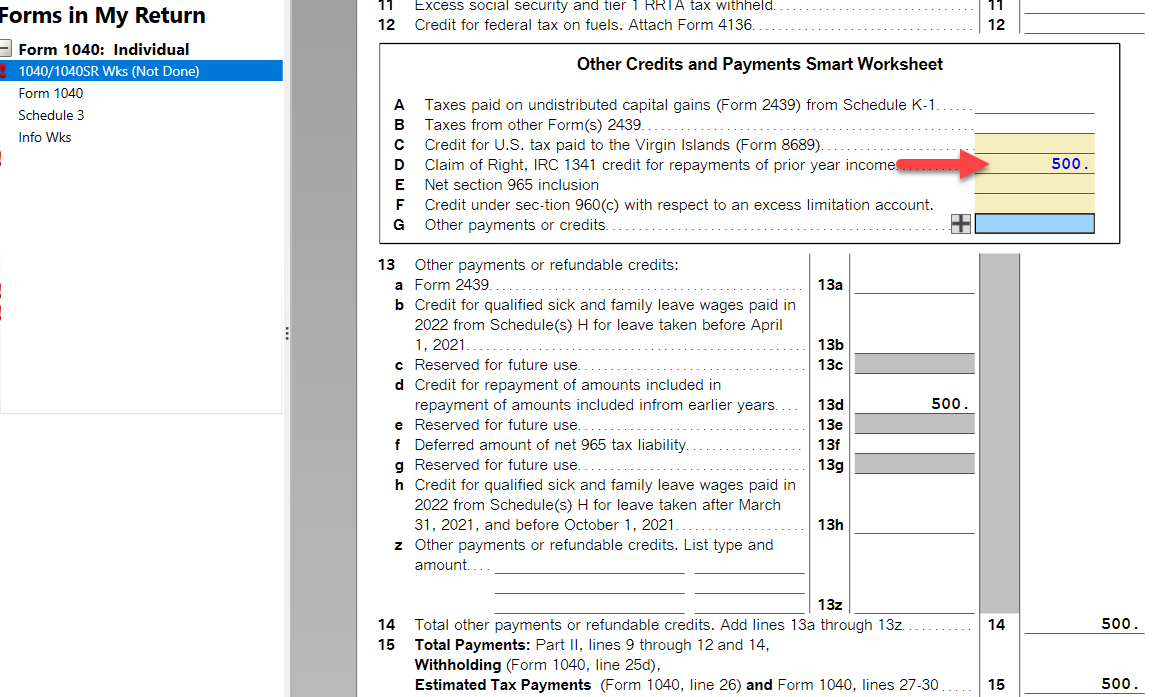
- In the list of forms on the left click on 1040/1040RSR Wks above the Form 1040 itself.
- Scroll down to Other Credits and Payments Smart Worksheet (near the bottom) and enter the amount that you have computed on Line D Claim of Right, IRC 1341 credit for repayments of prior year income.
- Click on the Step-by-Step or Easy Step icon in the upper right corner to return to the interview mode and finish working on your tax return. (See the image below if you choose the credit.) How do I switch from TurboTax Online to TurboTax CD/Download?
**Mark the post that answers your question by clicking on "Mark as Best Answer"
