VAer
Level 6
February 19, 2023
Solved

TurboTax Software: It does not ask question about 2022 Roth IRA conversion

  • February 19, 2023
  • 3 replies
  • 0 views

Note: All my traditional IRA contribution is non-deductible, due to employer-sponsored pension plan.


I have two 2022 form 1099-R for backdoor roth conversion, but Turbo Tax does not ask 2022 Roth conversion at all. It only asks Roth conversion before 2022 (while I never did roth conversion before). 2022 is the first year I did backdoor roth conversion.


I have finished all questions, but still could not find to way to input 1099-R information for 2022.


Did I miss anything? I am getting tired of Turbo Tax software.


Thanks.
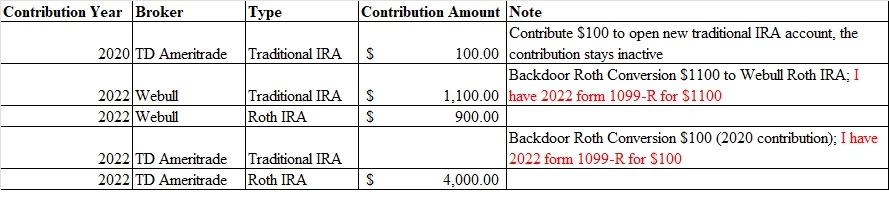


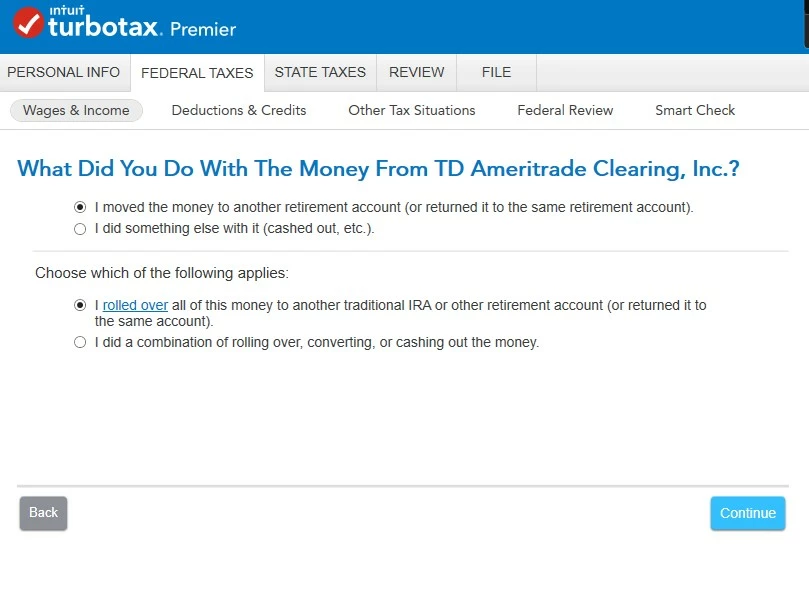
Edit: When I walk through page to page, it does not ask information about 1099-R. Based on below response, I type 1099-r in search box, now it allows me to import 1099-R. However, it asks additional questions after importing 1099-R. How should I answer those questions--What did you do with the money from TD Ameritrade Clearing, Inc?


I converted all the balance to Roth IRA, and traditional IRA account is open with $0 balance, how to answer the questions?


I also want to know how to answer below questions if I only convert part of traditional IRA to Roth IRA? (There is positive balance in traditional IRA)


I also want to know how to answer the questions if I intend to convert all the balance, but there is a few cents interest generated by the system on the date of conversion. For example, traditional IRA is zero balance, and I contribute $2000, it stays in the account for a few business days till being cleared, on the date when I submit Roth Conversion request, the balance is $2000.08, and I convert all $2000.08 to Roth IRA. However, what if system generates another 2 cents on the conversion date and leave $0.02 balance on my traditional account after Roth conversion? In this case, how to answer below questions?


Thanks.
 

Best answer by DanaB27

Yes, you choose “I moved the money to another retirement account (or returned it to the same retirement account)” and then select “I did a combination of rolling over, converting, or cashing out money” when you made a Roth conversion.


You don't select rollover. You would select that option (rollover) if you moved money into a similar retirement account. For example, from a 401 (k) to a traditional IRA or traditional IRA to a traditional IRA (these are all pre-tax). Another example is if you move it from a Roth IRA to another Roth IRA account (all after-tax). These are all movements with the same type of account and therefore consider a rollover. But if you move money from an account that is pre-tax (traditional IRA) to an after-tax (Roth) account then you will have to select conversion.


[Edited 2/19/2023 | 9:40 am PST]


@VAer 

3 replies

Level 15
February 19, 2023

You will report the 2022 Roth conversions when you enter your Form 1099-R and indicate in the follow-up questions that it was a conversions.


Please review these steps conversion steps:

  1. Click on "Search" on the top right and type “1099-R” 
  2. Click on “Jump to 1099-R”
  3. Click "Continue" and enter the information from your 1099-R
  4. Answer questions until you get to “Tell us if you moved the money through a rollover or conversion” and choose “I converted some or all of it to a Roth IRA
  5. On the "Review your 1099-R info" screen click "Continue"
  6. Answer "yes" to "Any nondeductible Contributions to your IRA?" if you had any nondeductible contributions in prior years ($100 from 2020).
  7. Answer the questions about the basis from line 14 of your last filed Form 8606 ($100 from 2020) and the value of all traditional, SEP, and SIMPLE IRAs


If you don’t get the conversion question, then you might have to delete and reenter your Form 1099-R.


Please don’t forget to enter your nondeductible traditional IRA contribution for 2022:

  1. Login to your TurboTax Account 
  2. Click on "Search" on the top right and type “IRA contributions” 
  3. Click on “Jump to IRA contributions"
  4. Select “traditional IRA
  5. Answer “No” to “Is This a Repayment of a Retirement Distribution?
  6. Enter the amount you contributed
  7. Answer “No” to the recharacterized question on the “Did You Change Your Mind?” screen
  8. Answer the next questions until you get to “Any Nondeductible Contributions to Your IRA?” and select “Yes” if you had a nondeductible contribution before this tax year.
  9. Enter your basis in the Traditional IRA from your 2021 Form 8606 line 14 (if you had a basis in the prior year)
  10. On the “Choose Not to Deduct IRA Contributions” screen choose “Yes, make part of my IRA contribution nondeductible” and enter the amount (if you have a retirement plan at work and are over the income limit it will be nondeductible automatically and you only get a warning and then a screen saying $0 is deductible).
**Say "Thanks" by clicking the thumb icon in a post. **Mark the post that answers your question by clicking on "Mark as Best Answer"
VAer
VAerAuthor
Level 6
February 19, 2023

Thanks. I type “1099-R” in search box and import form 1099-R.


Now I have new questions added in the original post. How to answer those questions?


@DanaB27 

Level 15
February 19, 2023

On the “What did you do with the money from TD Ameritrade Clearing, Inc?” screen you will select “I did a combination of rolling over, converting, or cashing out money.” and enter the amount next to "Amount converted to a Roth IRA account" (this should be $1,100 for your first Form 1099-R and $100 for your second Form 1099-R).


In your example, you would enter $2000.08 as converted because that is the amount moved from the traditional IRA to Roth IRA. Please be aware, if you have more than one Form 1099-R for the conversion then you will be asked for the conversion amount on each Form 1099-R.


TurboTax will later in the interview ask about the balance on December 31, 2022 and for your example, you would enter $0.02 ( but you can round down and enter $0).


@VAer 

**Say "Thanks" by clicking the thumb icon in a post. **Mark the post that answers your question by clicking on "Mark as Best Answer"
VAer
VAerAuthor
Level 6
February 19, 2023

@DanaB27 


Thank you very much. How about the choice above "I did a combination of rolling over, converting, or cashing out the money"? Is it correct to choose "I moved the money to another retirement account (or returned it to the same retirement account) ?


Could you please a little bit more about the choices (for better understanding)?


Thanks.

DanaB27Answer
Level 15
February 19, 2023

Yes, you choose “I moved the money to another retirement account (or returned it to the same retirement account)” and then select “I did a combination of rolling over, converting, or cashing out money” when you made a Roth conversion.


You don't select rollover. You would select that option (rollover) if you moved money into a similar retirement account. For example, from a 401 (k) to a traditional IRA or traditional IRA to a traditional IRA (these are all pre-tax). Another example is if you move it from a Roth IRA to another Roth IRA account (all after-tax). These are all movements with the same type of account and therefore consider a rollover. But if you move money from an account that is pre-tax (traditional IRA) to an after-tax (Roth) account then you will have to select conversion.


[Edited 2/19/2023 | 9:40 am PST]


@VAer 

**Say "Thanks" by clicking the thumb icon in a post. **Mark the post that answers your question by clicking on "Mark as Best Answer"
Level 2
April 8, 2023

I have the same issue, after I enter my 1099-R I chose “I moved the money to another retirement account”

then “I did a combination of the rolling over, converting, or cash out the money”

Tell us how much you moved to an IRA 401k or other retirement

i put the full amount under “Amount converted to Roth IRA account” somehow it still taxed me at 24% for withdrawal of my IRA which I fully converted to Roth IRA

Level 15
April 8, 2023

To confirm did you make a nondeductible contribution for 2022 and entered this in TurboTax? Or had a basis on line 14 of a prior year Form 8606 and entered it during the interview?


Please be aware, conversions are generally taxable unless you only made nondeductible IRA contributions. If you had pre-tax funds (deductible contributions) and after-tax funds (nondeductible contributions) in your traditional IRA then the pro-rata rule applies. This means that with each distribution/ conversion, you will have a taxable and nontaxable part. You can see the remaining basis on line 14 of Form 8606, this basis can be carried forward. Therefore, each distribution/conversion in the future will have a taxable and nontaxable part until the basis is all used.


The Backdoor Roth only works if your traditional/SEP/SIMPLE IRAs are empty. Please review the instructions below.


To enter the nondeductible contribution to the traditional IRA:


  1. Login to your TurboTax Account 
  2. Click on "Search" on the top right and type “IRA contributions” 
  3. Click on “Jump to IRA contributions"
  4. Select “traditional IRA
  5. Answer “No” to “Is This a Repayment of a Retirement Distribution?
  6. Enter the amount you contributed
  7. Answer “No” to the recharacterized question on the “Did You Change Your Mind?” screen
  8. Answer the next questions until you get to “Any Nondeductible Contributions to Your IRA?” and select “Yes” if you had a nondeductible contribution before this tax year.
  9. Enter your basis in the Traditional IRA from your 2021 Form 8606 line 14 (if you had a basis in the prior year)
  10. On the “Choose Not to Deduct IRA Contributions” screen choose “Yes, make part of my IRA contribution nondeductible” and enter the amount (if you have a retirement plan at work and are over the income limit it will be nondeductible automatically and you only get a warning and then a screen saying $0 is deductible).


To enter the Form 1099-R conversion: 


  1. Click on "Search" on the top right and type “1099-R”  
  2. Click on “Jump to 1099-R”
  3. Click "Continue" and enter the information from your 1099-R
  4. Answer questions until you get to “Tell us if you moved the money through a rollover or conversion” and choose “I converted some or all of it to a Roth IRA
  5. On the "Review your 1099-R info" screen click "Continue"
  6. Answer "yes" to "Any nondeductible Contributions to your IRA?" if you had any nondeductible contributions in prior years.
  7. Answer the questions about the basis from line 14 of your 2021 Form 8606 and the value of all traditional, SEP, and SIMPLE IRAs


@QDH 

**Say "Thanks" by clicking the thumb icon in a post. **Mark the post that answers your question by clicking on "Mark as Best Answer"
Level 2
April 12, 2023

This is the first year I am doing the Roth conversion and the online software is not working.  It is charging me a penalty even though i am doing it correctly.  There is no screen that asks if the 2022 contribution is as non-deductible.  Please help!!!!!