There are no known issues with the Mortgage Interest Deduction. Your best bet is to delete the Mortgage Interest data and re-input it.
In TurboTax Online:
Click the Federal tab on the left, then
Click Deductions & Credits, then
Click Your Home, and finally,
Mortgage Interest and Refinancing (Form 1098) Revisit.
I beg to differ with your answer. After posting my question, I discovered several others that point to my exact issue; including one that points to this issue going back as far as FY18. Care to explain that?
I'm having issues with what appears to be a bug when trying to allow deductions on my mortgage. It asks if certain situations apply to me (eg: debt > $1mm and acquired after 12/2017) and I check NO. Then when I save it reverts the answer back to YES. So it wipes out my mortgage interest deductions. I've tried deleting the entries and re-entering. I've also tried putting the mortgage balance at $1 and showing the mortgage had originated in 2000 (way before 2017). So please advise what's happening to the program.
This is definitely as issue. I have the desktop program and have sent my tax file to TT as requested. I have not received any kind of response from TT. There have been 2 workarounds suggested by other users.
The first is to go into the actual form/worksheet and check the “No” box.
The second is to answer the tax limitation question “No”, do not click continue, save the return, back out of the program, reopen the program and manually continue your return at the next step.
I have actually tried both solutions and both cleared all the error checks and were deemed ready to efile. I have successfully efiled using the second work around. My return has been accepted and approved by the IRS and state.
TT definitely needs to fix this problem. I don’t pay for tax software to have it calculate my taxes incorrectly. In my case, the error causes a taxes due amount of over $2500 vs a refund of over $500. Its unacceptable. It is doubly irritating to have TT repeated say “there is no bug”. I guess People can’t rely on TT to “Get your maximum refund, guaranteed”.
Hello Jake93,
I've also had a this problem but only this year. I'll try your ideas and hopefully this will work! I agree, this is a software bug and should be looked at. As many year users of TT our carryover data is crucial to accurate filing, more than the price of the annual software.
Kind regards
Peter62
As of today 2/21/20 - TT has NOT fixed this issue. I am running into the same problem. This is a big issue and involves a lot of money!! We do not pay TT to have to 'work arounds' ! Get your act together!! This is a problem!!
Hi Miyamotos,
I am also having the same issue. I tried tweeting TurboTax for support and they immediately responded and asked me to use this link to call for support / request a call: https://t.co/5hQt8uKpKX?amp=1
Once they called me back I explained that I researched this issue on the TT boards and found that this is a pretty well known issue and that there will be a bug fix in place by Monday 2/24/2020.
Unfortunately no immediate workaround (not ideal) if you're using TT download for OSx.
There is a workaround for this.
For desktop versions:
- In Forms view, locate and click on Tax & Int Wks on the left from the forms list
- On the form, scroll to Mortgage Interest Limited Smart Worksheet
- Click on NO to the right of the question, Does your mortgage interest need to be limited
For online versions:
- Under Deductions & Credits, expand the menu for Your Home
- Click Start/Revisit next to Mortgage Interest and Refinancing (Form 1098)
- Click through until you get to a screen that says Do any of these situations apply to you? Mark Yes.
- On the next screen, take out the zero.
- Click back and choose No.
Today is 2/26/20. Still no solution. I am having the same issue after entering a refinanced loan. This is clearly a problem. I think it is adding all of the loans together somehow. One question I did have when entering the 1098 forms is how to answer the question: is this loan refinanced or the original loan ? I had 3 "original loans" (one of my original 2 was sold to a different lender prior to my refi), so I selected "original loan for the first 3, then "refi" for the newest loan. Wonder if that is messing things up? Should I have selected differently? Everything I've seen says I did it right, but it makes me wonder. Somewhat happy to hear I'm not the only one having this problem this year, but wish they would fix the bug.
Have you tried the workaround list above? What version of the software are you using?
I agree. I am having the same problem after having deleted and re-entered the deductions three times. It appears that the program is adding the original loan and the refinanced loan amounts making it a requirement for the limitation due to an excessive of $750,000 loan amount,. When is this going to be corrected?
Do not alter the 1098. Enter the 1098(s) as reported. Box 2 should not be blank. Box 2 is the balance of the loan on 01-01-2019 OR the balance on the day the loan was taken out in 2019. Answer the interview questions carefully.
If you get an error concerning the balance, please follow these directions:
ONLINE USERS:
Please go back to the Home Mortgage Interest section:
Click Federal on the left side-bar
Click Deductions & Credits along the top
Scroll down to “Mortgage Interest and Refinancing (Form 1098)” Click Edit/Add
Scroll down the “Here’s your 1098 info” screen and click Done.
Next screen asks “Do any of these situations apply to you?” Select “Yes, one or all of these situations apply to me.” and Continue.
On the following screen, you will see the “Original amount”.
Enter the amount you can claim as a Home Mortgage Interest deduction in the “Adjusted amount” box. The Adjusted amount cannot be larger than the original amount or you will receive an error when trying to file. Instructions on who needs to adjust interest and how to calculate are available by clicking the blue “Help me figure this out” link.


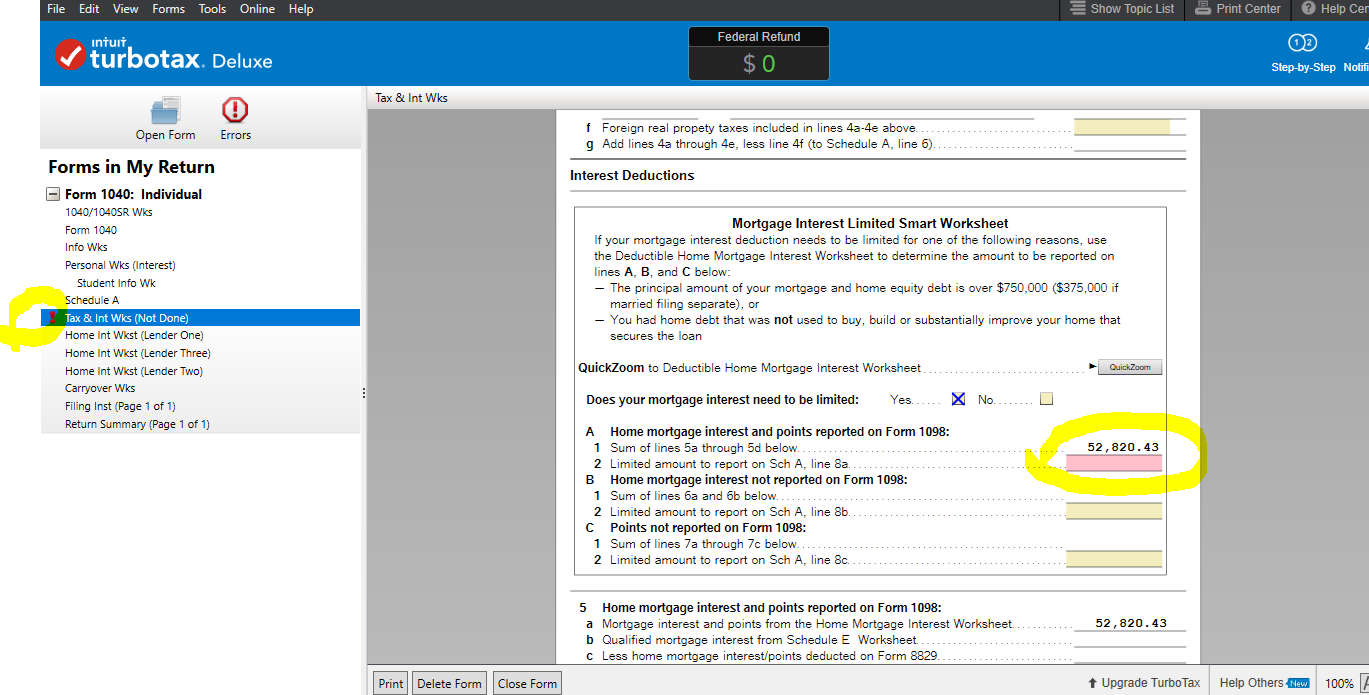
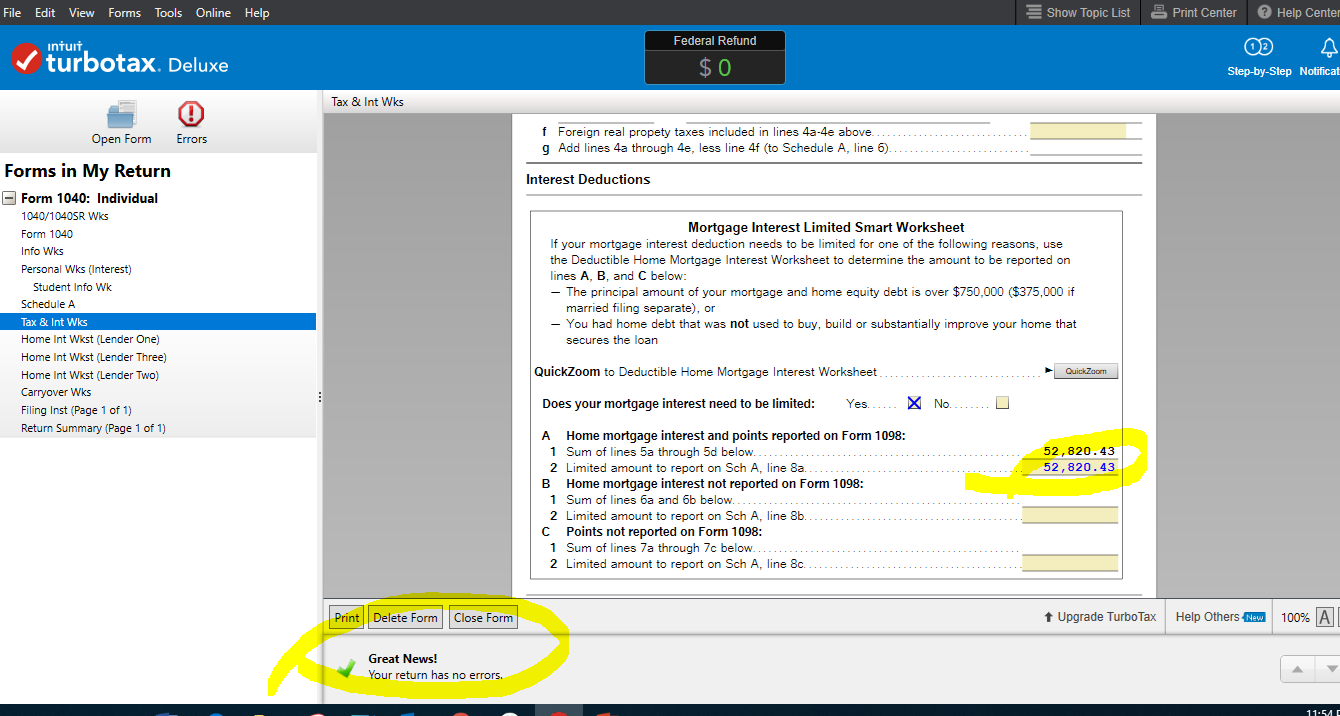
DESKTOP USERS:
Go into Forms (top right)
Enter the amount on Tax & Int Wks
Mortgage Interest Limited Smart Worksheet section
Line A2
OR
Step by Step
Federal
Deductions & Credits
Mortgage Interest, Refinancing and Insurance Click Update
Click Done
Click Yes, one or both of these situations apply to me. And Continue
Enter the Adjusted amount and Continue
To Jake93-
After spending almost 2 hours on the phone with TT I decided to google and found you fix.
Thank you-yours worked.
I have the same exact issue (4 1098s for the same mortgage for 2019) and TurboTax has calculated 3 different refund amounts when I used the workarounds here. I'm VERY concerned that TurboTax is not calculating things correctly.
How is it possible that SAME input results in three DIFFERENT results?
TurboTax - time to actually provide a meaningful response to this.
I have included a link to IRS Pub 936 if you would like to read why the interest can be computed at different amounts because of the many different factors that go into calculating it. It is helpful to understand the requirements. The questions the program asks may make more sense to you after reading the publication.
The interest may be limited by the amount of acquisition debt. The 1098 forms do not cover that in detail, therefore the answers to the interview questions are also needed.
If you use the instructions I posted above (not a work-around) you are adjusting the interest yourself. This would be done in a situation where the 1098 and interview questions do not provide enough information for the program to make the final calculation.
This is caused by the many stipulations the IRS has placed on the requirement to claim the home mortgage interest from 2018 going forward.
do you have 4 1098's because the mortgage was sold multiple times. In other words, you have the same mortgage on January 1 as you did on Dec 31 with no refinances. If so, I'd just make believe it's one 1098 and input the data as such.
what TT is testing for is whether you mortgage exceeds $750,00 and whether all the debt is considered 'acquisition' debt. None of that matters if the reason for the multiple 1098's is that the servicing was sold over and over again.
This work around works - thank you!!!
I sold a home and bought a new home - both mortgages qualify and are below the threshold.
My guess is that TT is adding the two mortgages for us which is more than the limit and defaulting to "YES" based on the added mortgages
For the second year in a row, turobtax incorrectly added an equity line to my mortgage interest deduction calculation and allowed for a full deduction of mortgage interest. The IRS flagged my 2018 return as a result, and it's now being audited. While preparing the 2019 return, I encountered the same issue. I had to manually adjust my entries in the mortgage interest worksheet. Turbotax added an equity line maximum balance of $100K and summed up the maximum for home mortgage and an equity line to $1,100,000, then fully deducted mortgage interest. I do not have an equity line and didn't enter one. Why does this keep happening?
That would be done possibly for the state return, since California does allow up to 100,000 home equity loan interest.
Are you filing a California state return?
Thank you, @jake93 your suggested workaround -- check "No," save, then back out without clicking "continue" -- worked for me.
And I agree it is very frustrating that, as of March 28, over a month after this was first reported, the bug still exists. This bug changes a $2,700 refund to a $1,400 tax bill for me. Huge difference.
Very disappointed in Intuit. The whole American tax system is a joke; don't even get me started on how companies like Intuit actively lobby to keep it needlessly difficult -- and then offer products that only create more difficulties.
I'm having the same problem with TT this year. I have multiple 1098s on a construction loan that was extended, then expanded again with a different loan number, then finally for about 30 days when building loan was converted to a mortgage before being sold off to a big bank. So all three are 'original loans' on the same home (a vacation home). TT appears to add up the value of my primary home and these 3 loans AND the value of the mortgage after it was sold to a larger bank. I'll try the workarounds from last year's feedback.
If there is a refi and there was an outstanding mortgage principal listed in both of them on Line 2 on the 1098. When you do put an outstanding balance in both forms, then the program adds them together and if that number is greater than $750k, then it puts you in the category to "limit interest". To get that to go away, you need to go back to the deductions section and click on "edit" mortgage interest statement. Change the line 2 of the mortgage that you no longer owe on (like the one that you refinanced and paid off) to a 0 (zero) because you have refinanced out of that loan and no longer have an "outstanding mortgage principal". Once you change one of them to zero (the one that was paid off by the refinance) then it should no longer pop up with that error at the end when you go to file
FYI, while this move suppresses the error it creates other possible issues as it ignores the fact that the average (arithmetic mean) balance of the mortgages (which is what the IRS requires) is not being reported. Rather, you are just selecting one essentially arbitrarily. One one hand, this will probably not change the end result deductible mortgage interest (likely your goal), but TT should fix this so you don't have to fudge the data to work around the code error. More importantly, for a subset of users near the deductibility limits, this method can easily create inappropriately high or low deduction claims. Regardless, I certainly don’t think it is wise for TurboTax employees to be suggesting users intentionally feed the program erroneous data.
See several recent threads and posts I have posted in (you can click on my username I believe) - there is an entire community of people experiencing this issue and I would suggest waiting to file (if able) until a definitive resolution is offered. Just my $0.02 after having spent hours and hours digging much deeper into this than I ever wanted.