

- Mark as New
- Bookmark
- Subscribe
- Subscribe to RSS Feed
- Permalink
- Report Inappropriate Content
Deductions & credits
To remove the childcare information request, you can delete form 2441 by selecting the following if you are using TurboTax Online
- On the menu bar on the left that shows.
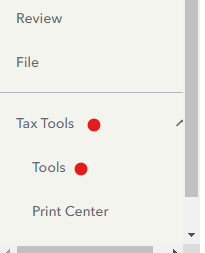
- Select Tax Tools
- On the drop-down select Tools
- On the Pop-Up menu select Delete a Form
- This will give you all of the forms in your return
- Scroll down to the form you want to delete
- Select the Form
- Click on Delete next to form 2441
- If you see any dependent care worksheets, you will need to delete them first
Always use extreme caution when deleting information from your tax return. There could be unintended consequences.
If you are using the desktop version, then you will just need to click on forms mode, then click on form 2441 and any dependent care worksheets and click delete in the bottom left corner of the page screen.
**Say "Thanks" by clicking the thumb icon in a post
**Mark the post that answers your question by clicking on "Mark as Best Answer"
**Mark the post that answers your question by clicking on "Mark as Best Answer"
February 27, 2024
6:41 AM
