- Mark as New
- Bookmark
- Subscribe
- Subscribe to RSS Feed
- Permalink
- Report Inappropriate Content
After you file
@johnlkelly wrote:
I followed these instructions but I'm unable to download my tax data file for the 2019 return I started online. Do you know if there is another method to import my 2019 data entered online to my desktop version so I don't have to start all over again?
Thanks in advance.
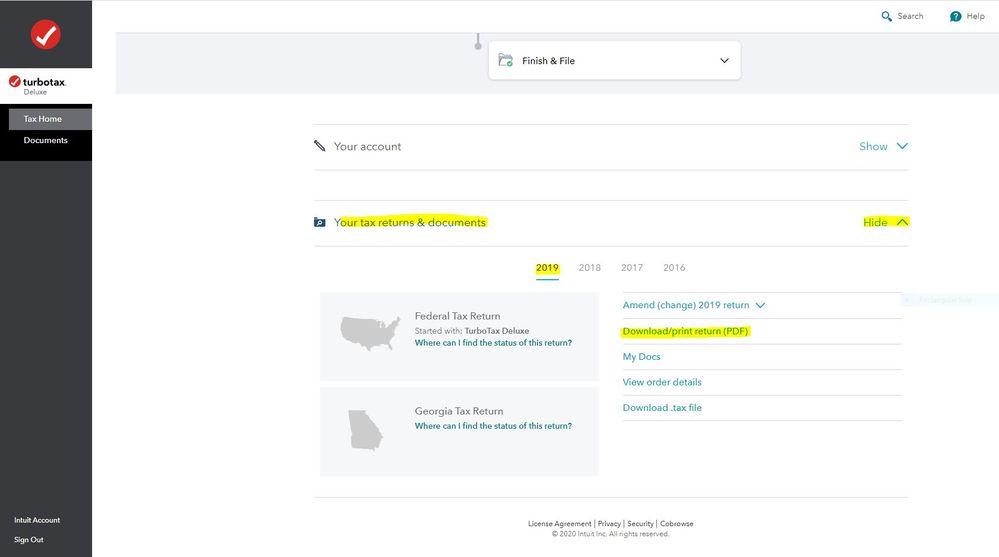
You may have to start a 2020 tax return before the links on the Tax Home web page become available. In that case start the 2020 tax return with the User ID you used for the 2019 return. Once some basic information has been transferred over, Tax Home should be visible on the left column. Click on Tax Home and then the other links will be shown as in this screenshot.
To access your prior year online tax returns sign onto the TurboTax website with the User ID you used to create the account - https://myturbotax.intuit.com/
Scroll down to the bottom of the screen and on the section Your tax returns & documents click on Show. Click on the Year and Click on Download/print return (PDF) and Download .tax file