
- Mark as New
- Bookmark
- Subscribe
- Subscribe to RSS Feed
- Permalink
- Report Inappropriate Content
Get your taxes done using TurboTax
1) IF you used the Online software, then you must be logged into the 'Exact-Same" account you used in those prior years.
2) IF you are logged into the proper Online account, you may need to start thru the initial stages of the 2020 tax return interview, so that you can get the left-side menu selections to show up...once you do that:
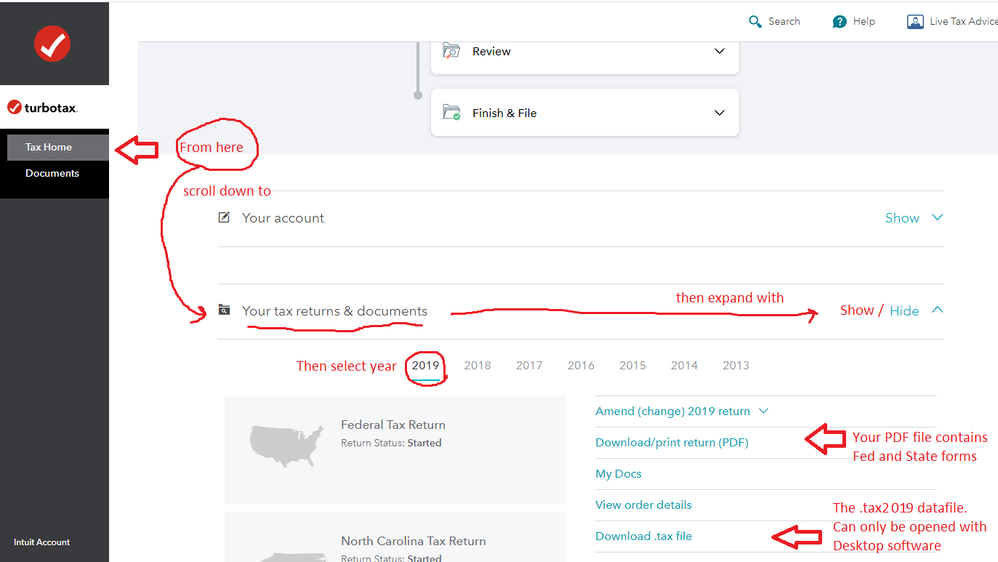
For any prior years tax forms......( 2019 is now loaded into the prior years section )
....... click on Tax Home
..............Scroll down to the bottom of the screen and on the section Your tax returns & documents
.....................click on Show.
.............................Click on the Year and then click on Download .tax file
___________________________________________
____________*Answers are correct to the best of my knowledge when posted, but should not be considered to be legal or official tax advice.*
January 6, 2021
6:32 AM
