

- Mark as New
- Bookmark
- Subscribe
- Subscribe to RSS Feed
- Permalink
- Report Inappropriate Content
Get your taxes done using TurboTax
Where are you seeing this? Are these payments you entered on your return from payments you made during 2023?
Estimated tax payments would not be included with income. Instead, if you made the payments in 2023, they would be included on your line 26 of your form 1040 as 2023 Estimated tax payments and amount applied from 2022 return. They would then be a part of your total other payments on line 33 of your 1040 form.
Or are these the vouchers you are printing along with your return that you are filing, telling you that you need to make these payments. They are not included in with your income. They are simply telling you to make these payments next year.
If you are seeing them included with income, then it is likely that you entered that in the income section instead of the deductions and credits section. You will need to delete them from where ever you entered them by clicking the trash can next to the entry and then enter them by selecting the following:
• Federal
• Deductions and Credits
• See full list
• Show More next to Estimates and other taxes paid
• Start next to Estimated Tax Payments
Enter your quarterly taxes paid
Anything that is included in your income would be showing up on lines 1 through 8 of your 1040 form.
On the menu bar on the left that shows.
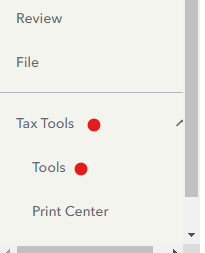
- Select Tax Tools
- On the drop-down select Tools
- On the pop-up menu
- Select View Tax Summary
- On the left sidebar, select Preview my 1040 On the menu bar on the left that shows.
If you are using the desktop version you will simply need to switch to forms mode.
**Mark the post that answers your question by clicking on "Mark as Best Answer"
