

- Mark as New
- Bookmark
- Subscribe
- Subscribe to RSS Feed
- Permalink
- Report Inappropriate Content
Retirement tax questions
''You can choose to nominee the portion of the dividends that should be reported on the estate Form 1041. The estate would report any dividends earned after the death of the owner.
- Sign into your TurboTax account
- Search (upper right) for 1099div > Jump to .... link
- Select 'Change how I enter my form' > Select 'Type it in myself'
- Complete the Form 1099-DIV screen
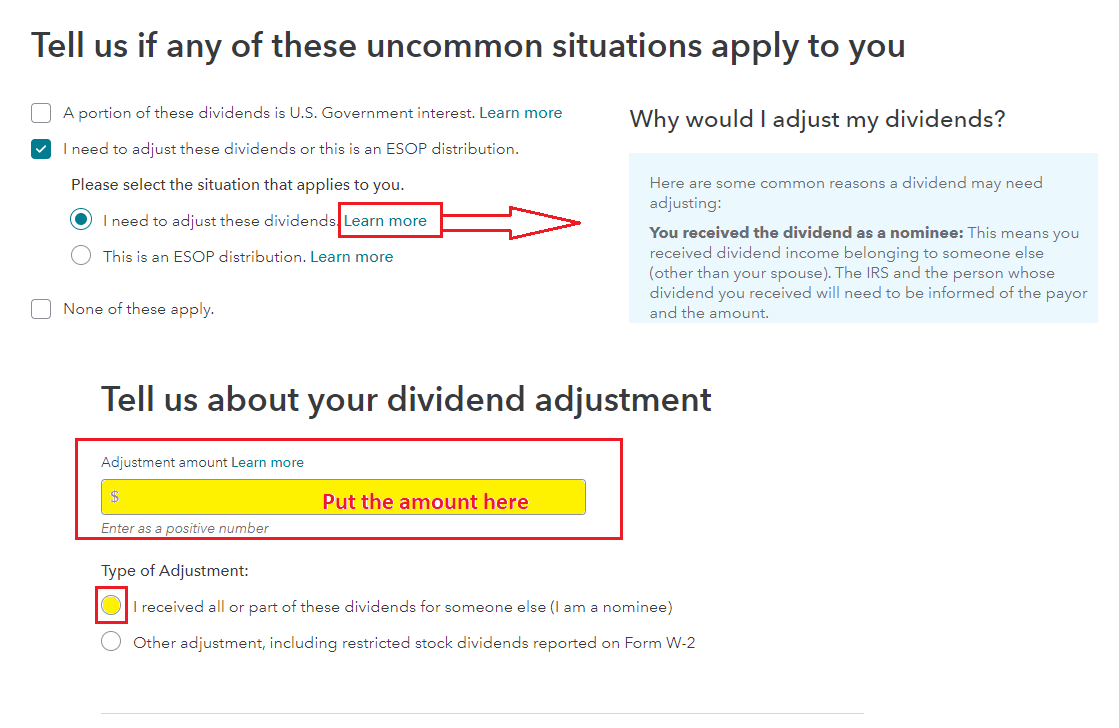
- Select 'I need to adjust these dividends or this is an ESOP distribution.' > Select 'I need to adjust these dividends.'
- Enter the amount that should be reported on the estate return
- Select 'I received all or part of these dividends for someone else (I am a nominee)'
- TurboTax will make the necessary adjustment on your tax return.
- See the image below.
You can use the following procedure to actually nominee the distribution to the estate.
Nominee returns.
Generally, if you receive a Form 1099 for amounts that actually belong to another person or entity, you are considered a nominee recipient. You must file a Form 1099 with the IRS (the same type of Form 1099 you received). You must also furnish a Form 1099 to each of the other owners.
File the new Form 1099 with Form 1096 (this is a transmittal for the 1099) by mailing to the Internal Revenue Service Center for your area. (Provided on the Form 1096)
- On each new Form 1099, list yourself as the payer and the other owner, as the recipient. On Form 1096, list yourself as the nominee filer, not the original payer. The nominee is responsible for filing the subsequent Forms 1099 to show the amount allocable to each owner.
If you choose this one here is the TurboTax program for creating 1099s.
The forms filed with the IRS should be the red copy so if you don't have a color printer, go to the IRS website and order the forms here:
**Mark the post that answers your question by clicking on "Mark as Best Answer"
