

- Mark as New
- Bookmark
- Subscribe
- Subscribe to RSS Feed
- Permalink
- Report Inappropriate Content
Investors & landlords
You should add the depreciation for all prior years, if the total amount in TurboTax is not correct as calculated for prior years. Once you have that number, you should compare it to the prior depreciation calculated by TurboTax and then make the following adjustment.
When you are in the asset for your rental property (Search rentals > enter > Click on the jump to link and Edit beside your rental):
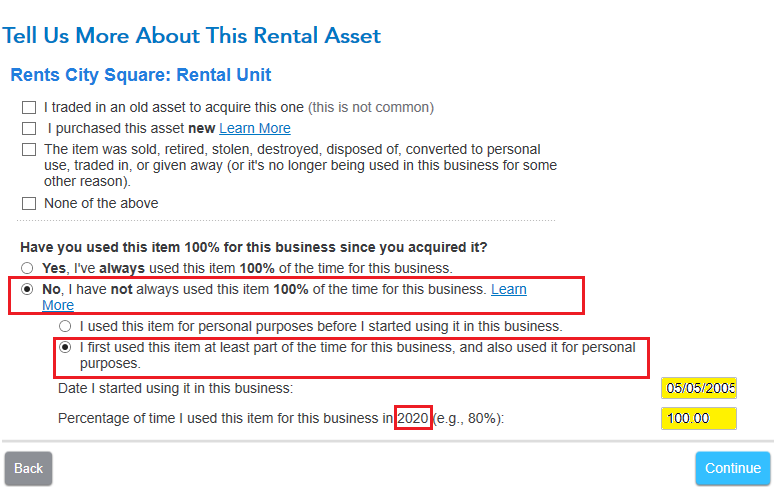
- The screen 'Tell Us More About This Rental Asset'
- Select No, I have not always used this item 100% of the time for business
- Enter the date first used at least part of the time for business and also personal use
- Enter the date you stated using it for business
- Enter the percentage of business use for 2020 (100%)
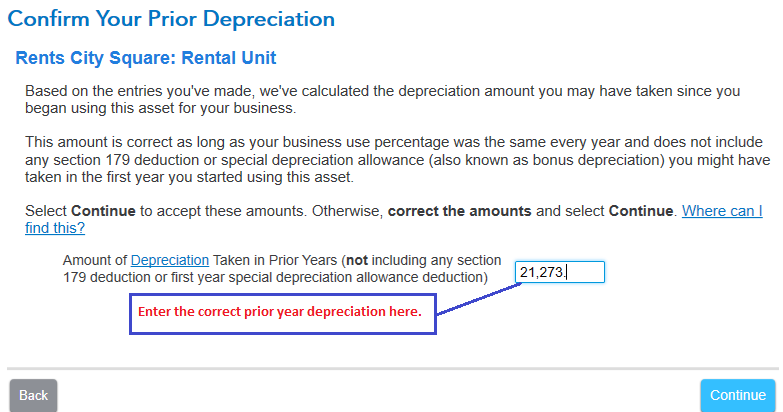
- The screen 'Confirm Your Prior Depreciation' will allow you to enter the full amount of prior year depreciation.
- See the images below.
If you have more than one asset for this rental property and if other assets were also part personal and part business you must complete this information for each of those assets. Once complete TurboTax will know how to enter the appropriate information on your tax return.
Sales price allocation if there is more than just house and land.
-
Use the original cost of each asset listed on depreciation (all belongs to house B now) add those together then divide each one by the combined total to find the percentage of the cost for each asset. Use that percentage times the sales price and sales expenses to find the selling price/sales expenses for each asset.
Example: Original Cost (of each asset on your depreciation schedule)
$10,000 Land = 13.33%
$50,000 House = 66.67%
$15,000 Improvements = 20%
$75,000 Total = 100%
Multiply each percentage times the sales price/sales expenses to arrive at each individual sales price/sales expense.
**Mark the post that answers your question by clicking on "Mark as Best Answer"
