

- Mark as New
- Bookmark
- Subscribe
- Subscribe to RSS Feed
- Permalink
- Report Inappropriate Content
Deductions & credits
Did you select Personal item sales when you entered your 1099-K?
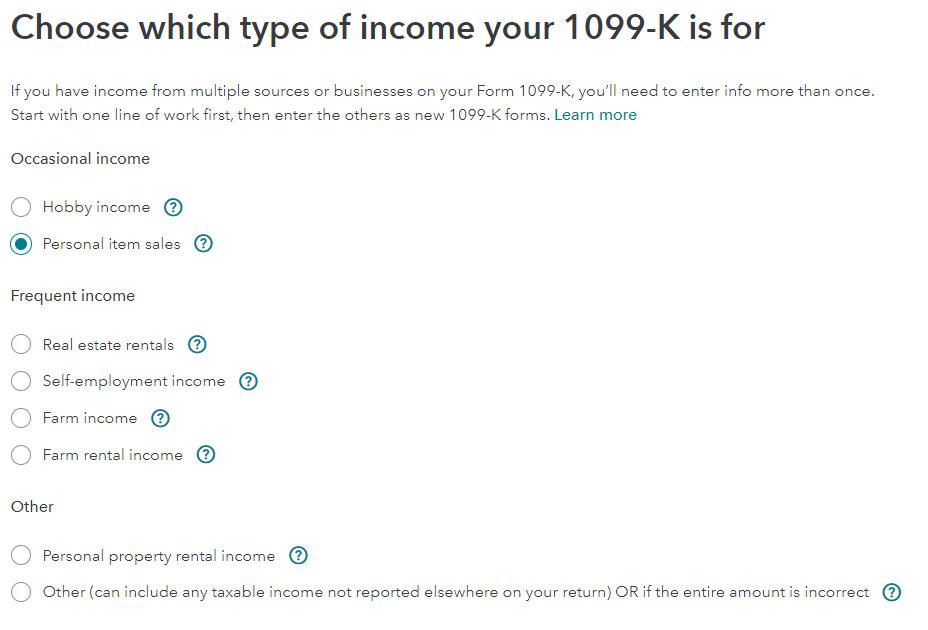
You may have added an entry to your IRS form 8949 / Schedule D to put it out of balance. Review the entries listed on IRS form 8949 / Schedule D to make sure that the income reported does not exceed the income reported on the IRS form 1099-K.
I entered an IRS form 1099-K and reported it as a personal item sale. Then I entered the IRS form 8949 / Schedule D Capital Gain and Loss entry. The 1099-K income equaled the IRS form 8949 / Schedule D and the entry was in balance.
Then I clicked Add another sale and entered another personal item sale for $100 income and $100 expense. I ran Review and received a message similar to the message that you received.
So the 1099-K / IRS form 8949 / Schedule D became out of balance by the $100.
I deleted the $100 entry that I added by clicking the delete trashcan to the right of the entry at the screen Review your xxx sales.
I ran Review and the error was gone.
**Mark the post that answers your question by clicking on "Mark as Best Answer"
