

- Mark as New
- Bookmark
- Subscribe
- Subscribe to RSS Feed
- Permalink
- Report Inappropriate Content
Deductions & credits
From the IRS FAQs on the Sales Tax Calculator: There are two key features of a general sales tax: What is taxed (the tax base), and how much it is taxed (the tax rate). Among states that have local sales taxes, these two features create three basic categories:
- When the local tax base is the same as the state tax base and there is just one local sales tax rate throughout the state – The local sales tax amount can be included with the state table using a combined rate on the same items.
- When the local tax base is the same as the state tax base, but the local sales tax rates vary throughout the state - The local sales tax amount can be derived from the state amount using the ratio of the local rate to the state rate.
- When both the local tax bases and the local sales tax rates vary throughout the state - The local sales tax amount must be derived independently from the state amount.
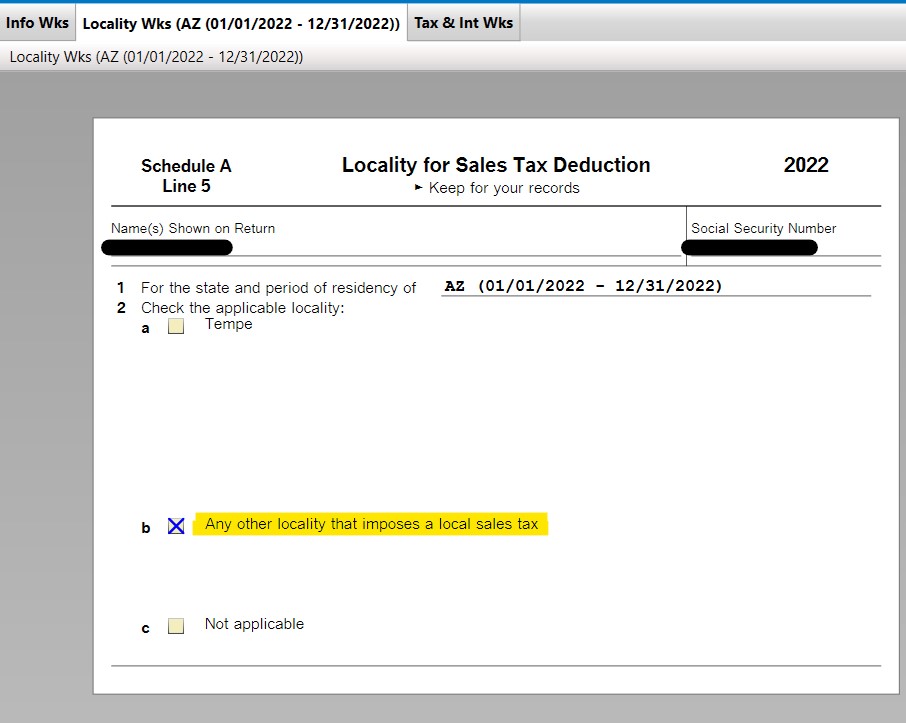
There are 6 states where the different categories and methodologies will produce different outcomes; Arizona is one of them. But you can change it in Forms mode. Click on Forms in the upper right corner and scroll down until you find the Locality Wks (01/01/2022 - 12/31/2022). Your zip code defaults to box a) Tempe (the highest rate possible), but if you put an X on b) Any other locality that imposes a local sales tax, it should match the IRS calculator. Option c) provides no locality deduction.
**Mark the post that answers your question by clicking on "Mark as Best Answer"
