

- Mark as New
- Bookmark
- Subscribe
- Subscribe to RSS Feed
- Permalink
- Report Inappropriate Content
Deductions & credits
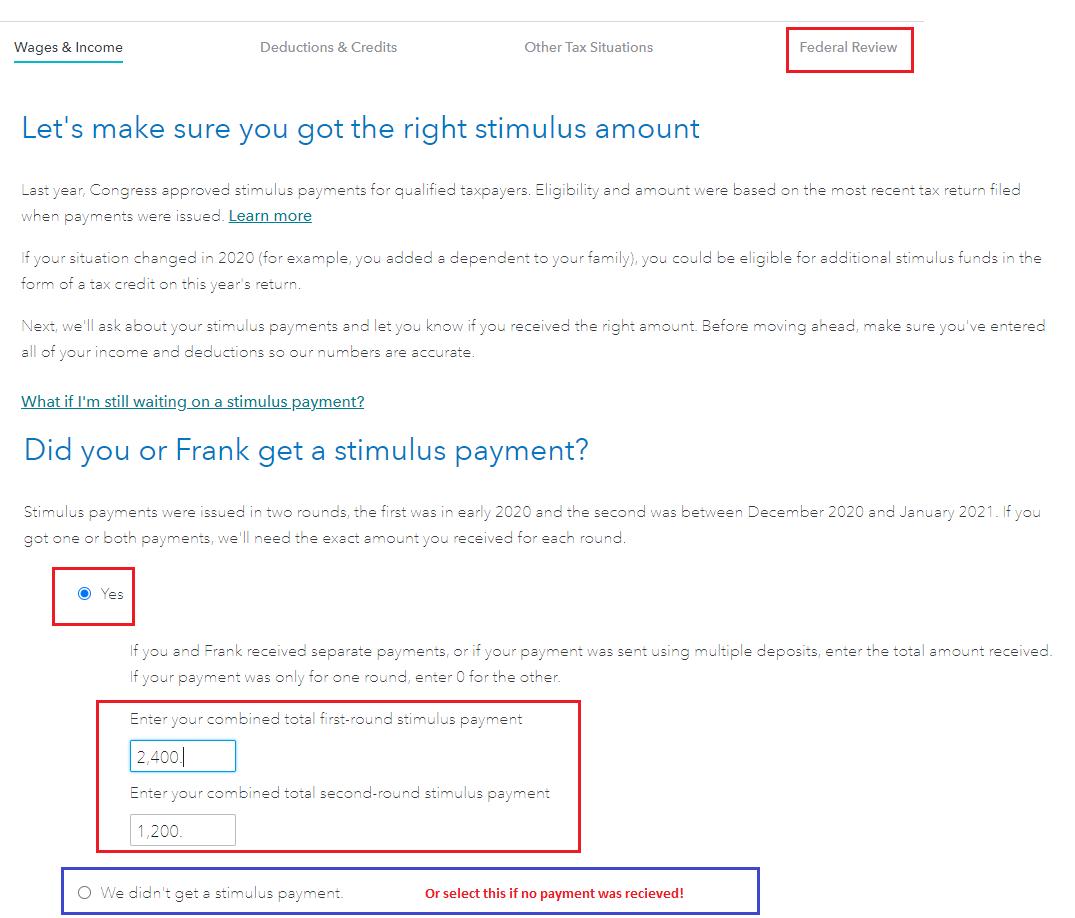
The Federal Review does take you through the stimulus questions to determine the amount you received. Be sue to answer the question 'yes or no' when TurboTax asks you whether the amounts they calculated were correct. If you answer 'no' then you can enter exactly what you did receive.
You can use your actual amount you know you received in each round (1st and 2nd) or use the IRS site to determine what to use on your return. If you know what you received then use those figures.
- Get My Payment - Select the button Get My Payment to see if your information is current based on the payments you noted that you did receive.
- In TurboTax Online once your return is open, select Wages & Income (to enter the tax return).
- Select Federal Review at the top of the page > Continue to answer the questions for Let's make sure you got the right stimulus amount
- TurboTax will then include any stimulus amount due on your 1040 form - either added to your refund or reduce the amount due.
- See the image below.
**Say "Thanks" by clicking the thumb icon in a post
**Mark the post that answers your question by clicking on "Mark as Best Answer"
**Mark the post that answers your question by clicking on "Mark as Best Answer"
February 15, 2021
7:39 AM
