

- Mark as New
- Bookmark
- Subscribe
- Subscribe to RSS Feed
- Permalink
- Report Inappropriate Content
State tax filing
The 2020 Michigan Schedule 1, Line 22, boxes A-H, are based on your input in your return. Box D, specifically, is dependent on your year of birth (if you were born after 1952) and if you are retired.
If this box is being checked, and it should not be, then most likely, a question in the Michigan return about being retired was asked incorrectly.
Please follow these steps to change your retirement status in your Michigan return:
- Open your return.
- Click on State.
- Click on Edit for your Michigan return.
- Click Edit next to the Income section.
- Click Edit next to the Social Security (SSA) input.
- Click Yes on the page Do you want to change your entries?
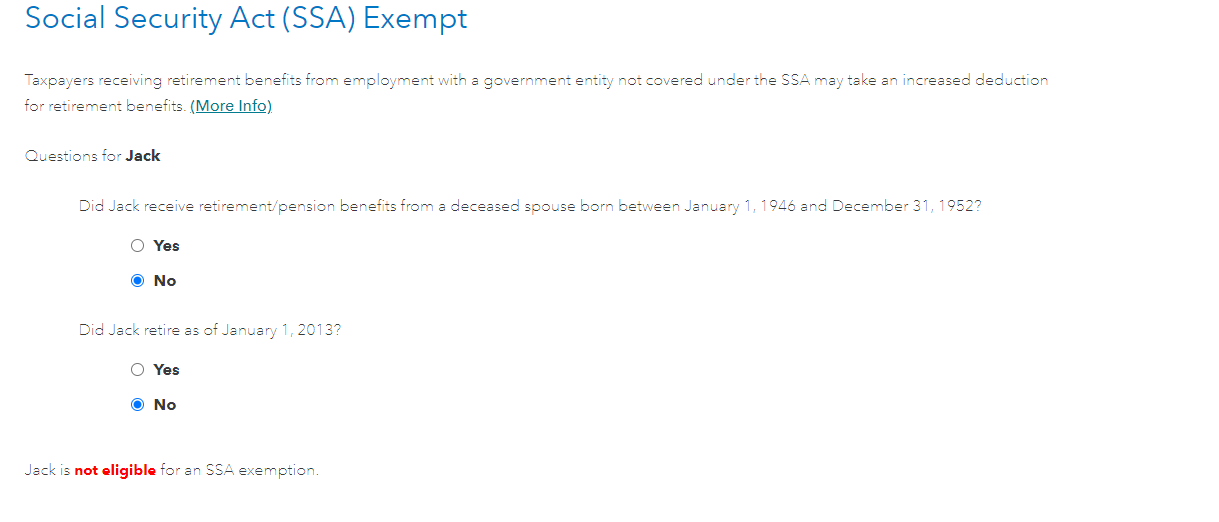
- Answer No for the question Did you retire as of January 1, 2013?
I have attached a picture below for additional guidance.
**Say "Thanks" by clicking the thumb icon in a post
**Mark the post that answers your question by clicking on "Mark as Best Answer"
**Mark the post that answers your question by clicking on "Mark as Best Answer"
February 17, 2021
10:48 AM
