

- Mark as New
- Bookmark
- Subscribe
- Subscribe to RSS Feed
- Permalink
- Report Inappropriate Content
State tax filing
Go to the "My Info" from the black panel on the left side of your page.
Under "My Info", select Edit to the right of your name. It will take you to your personal info page.
Scroll down below your Occupation. You will see the following asking if you are member of the armed services. Make sure you have checked "Yes".
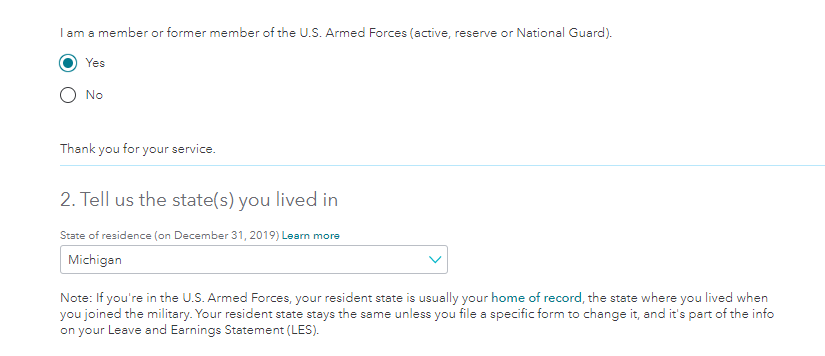
Once you make this change, it should flow into your Michigan return and will treat the military pay as being nontaxable within Michigan.
**Say "Thanks" by clicking the thumb icon in a post
**Mark the post that answers your question by clicking on "Mark as Best Answer"
**Mark the post that answers your question by clicking on "Mark as Best Answer"
February 4, 2020
5:25 PM
