

- Mark as New
- Bookmark
- Subscribe
- Subscribe to RSS Feed
- Permalink
- Report Inappropriate Content
State tax filing
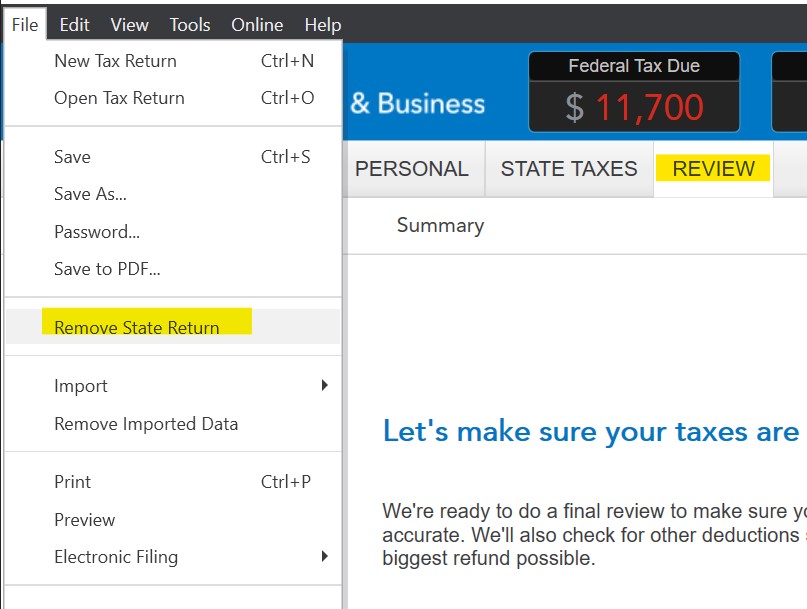
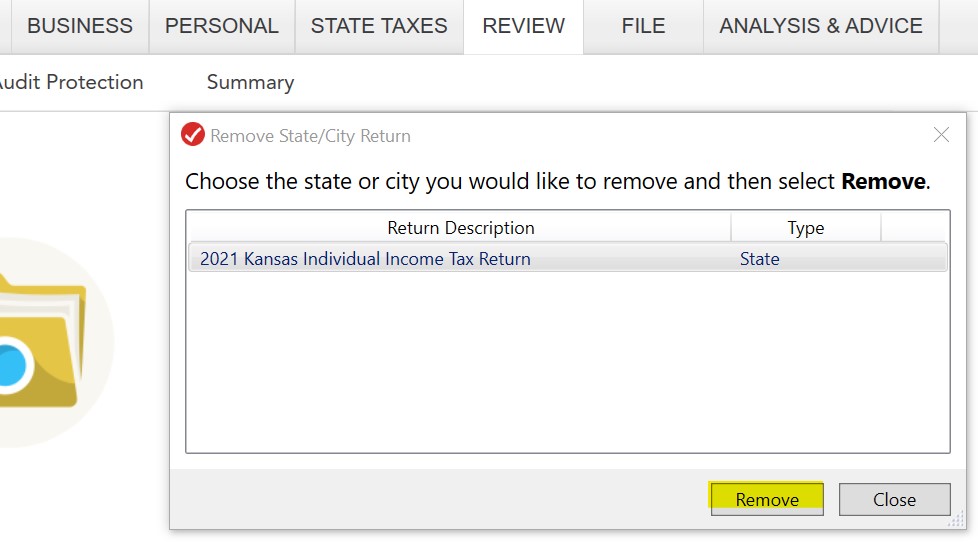
You can e-file your federal return now and then file your Kansas return by mail after your federal is accepted. If using desktop software, you can remove the Kansas return, see images below. Click on the Review menu at the top, then choose the File Menu - and then Remove State Return. Choose the Kansas return and then click on Remove.
E-file your federal return. Once accepted, open the return, click on State Taxes, and start your Kansas return again. Click through the screens and when you go through the filing steps, choose File by Mail.
**Say "Thanks" by clicking the thumb icon in a post
**Mark the post that answers your question by clicking on "Mark as Best Answer"
**Mark the post that answers your question by clicking on "Mark as Best Answer"
April 13, 2022
2:08 PM
