

- Mark as New
- Bookmark
- Subscribe
- Subscribe to RSS Feed
- Permalink
- Report Inappropriate Content
State tax filing
In your situation, it is recommended that you first log out of your TurboTax Online and delete your cookies.
On rare occasions, they may make your browser think you already did something that you still need to do. To fix that, you'll need to delete (clear) the cookies from your browser. For more information on how to delete your cookies on the browser you are using, please see How do I delete cookies?.
Once complete, please follow these steps to include Schedule M1LTI on your return:
- Open your tax return.
- Click on State on the left-hand side.
- Click Edit.
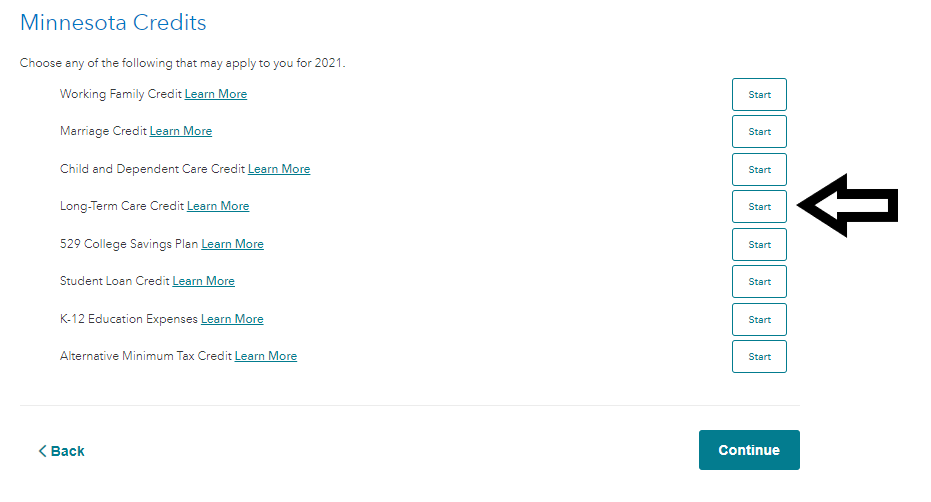
- Continue through the interview until you reach the screen Minnesota Credits.
- Select Start next to Long-term care credit.
- Follow the on-screen instructions.
I have attached a screenshot below for further guidance. Using this screen, I was able to input long-term care premiums and got a credit on my Minnesota return using the steps above.
**Say "Thanks" by clicking the thumb icon in a post
**Mark the post that answers your question by clicking on "Mark as Best Answer"
**Mark the post that answers your question by clicking on "Mark as Best Answer"
February 15, 2022
5:58 AM
