

- Mark as New
- Bookmark
- Subscribe
- Subscribe to RSS Feed
- Permalink
- Report Inappropriate Content
Get your taxes done using TurboTax
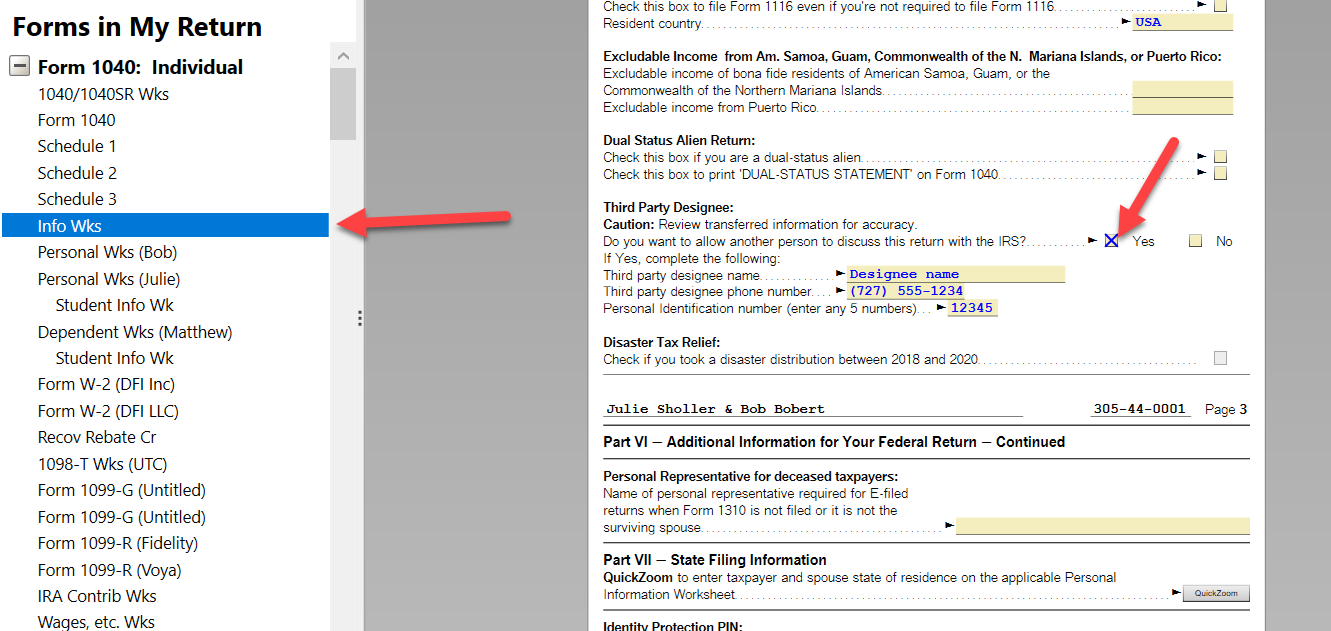
You can enter a third party designee using Forms mode in TurboTax Desktop (from a disc or download). This is how to find it:
- Click on the white Forms icon in the upper right corner.
- Select Info Wks from the list on the left, highlight it.
- Scroll down the bottom of Part V (about three quarters of the way down).
- Click the Yes pick box and then enter the name, phone number and PIN for the designee.
The PIN is a self selected 5-digit number. In other words, just enter five digits, but make note of them in case you need to contact the IRS about this return.
**Say "Thanks" by clicking the thumb icon in a post
**Mark the post that answers your question by clicking on "Mark as Best Answer"
**Mark the post that answers your question by clicking on "Mark as Best Answer"
March 31, 2022
5:25 AM
3,075 Views
