

- Mark as New
- Bookmark
- Subscribe
- Subscribe to RSS Feed
- Permalink
- Report Inappropriate Content
Get your taxes done using TurboTax
My advice is to sign into your account (or set it up) online to check for a document there. Not all SSA-1099s have been received as of today, but they are now all online for printing.
- My Social Security
- Sign in or create an account
- Once you have your account open click on 'Replacement Documents'
- On this page towards the bottom you will find the SSA-1099 that can be printed
- If you do not see a document, then you should file your return.
If you want to add in the amount of your total social security you can add the form and enter the medicare as well just to see if you have any part of it that would be taxable. Once you do that here are the steps to view your 1040 before you finalize it.
ou can view your 1040 form before you e-file:
- Open or continue your return. (TurboTax Online)
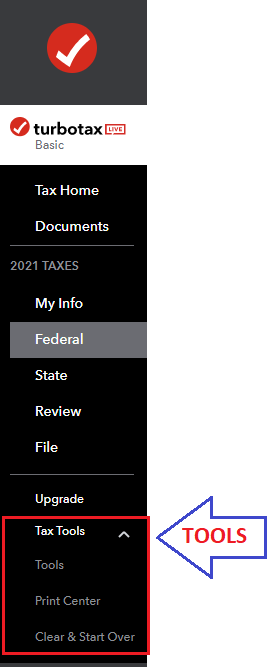
- With the Tax Tools menu open, you can then:
- View only your 1040 form: Select Tools. Next, select View Tax Summary in the pop-up, then Preview my 1040 in the left menu.
- TurboTax CD/Desktop - Select Forms (upper right) > Scroll to Schedule 3 (left) > View line 11
- Scroll to line 6b to see if any of the social security is taxable. If not, simply file your return.
**Say "Thanks" by clicking the thumb icon in a post
**Mark the post that answers your question by clicking on "Mark as Best Answer"
**Mark the post that answers your question by clicking on "Mark as Best Answer"
February 11, 2022
1:42 PM
