

- Mark as New
- Bookmark
- Subscribe
- Subscribe to RSS Feed
- Permalink
- Report Inappropriate Content
Get your taxes done using TurboTax
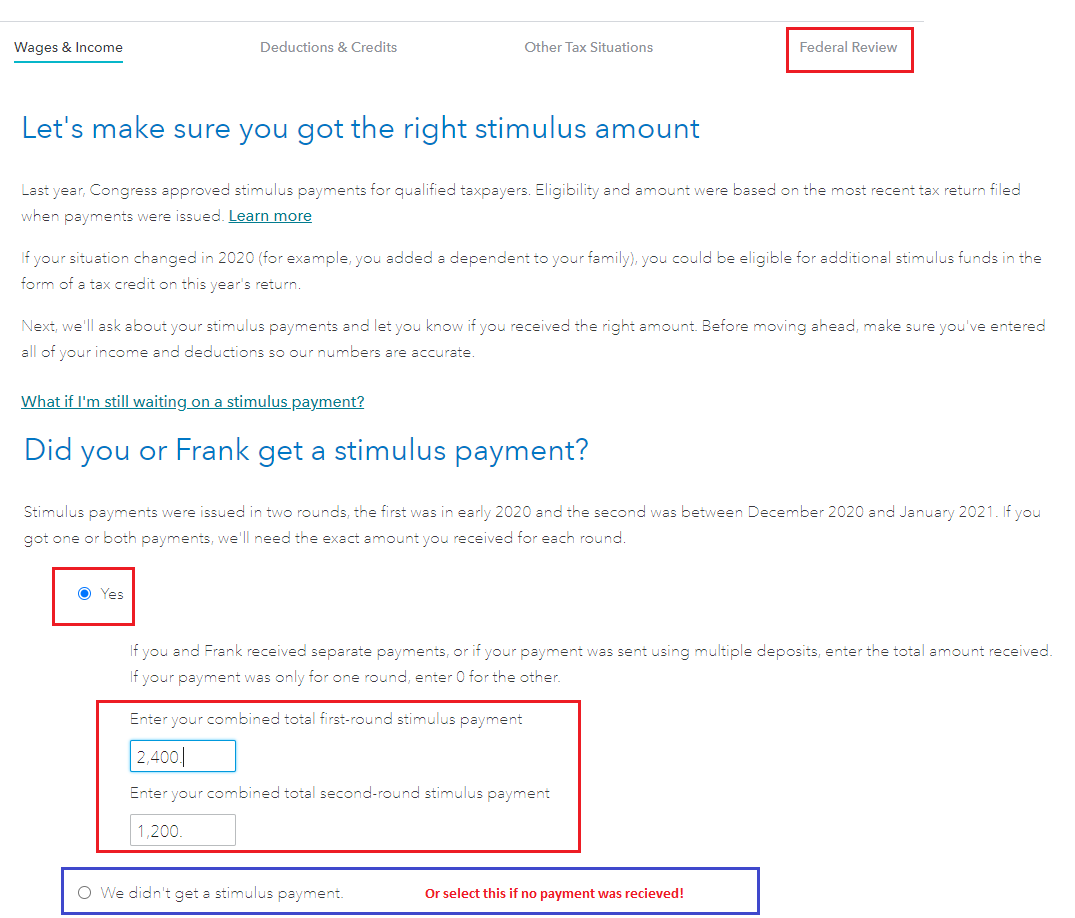
You should enter the stimulus payments you actually received. The first and second stimulus payments are based on your 2020 tax return. Once the IRS does receive your return they will reconcile the payments you already received and then process your return with the correct amount you are entitled to.
Helpful links are included below.
-
Get My Payment tool may be functional for you at this time to see what the IRS has on file for you.
-
Here is a list of Get My Payment FAQs,
In TurboTax Online, to claim the Recovery Rebate credit please do the following:
- Sign into your account and continue from where you left off
- Click on Federal in the left-hand column, then on Federal Review on the top of the screen
- On the next page titled Let's make sure you got the right stimulus amount, click on Continue
- Follow the interview - record the correct payments
- TurboTax will determine whether you are entitled to any additional stimulus
- Any stimulus amount remaining due to you will show as a credit on line 30 of your form 1040.
**Say "Thanks" by clicking the thumb icon in a post
**Mark the post that answers your question by clicking on "Mark as Best Answer"
**Mark the post that answers your question by clicking on "Mark as Best Answer"
April 5, 2021
12:59 PM
