

- Mark as New
- Bookmark
- Subscribe
- Subscribe to RSS Feed
- Permalink
- Report Inappropriate Content
Get your taxes done using TurboTax
Try the following to ensure the state return is being populated based upon your input.
Go to the My Info section of TurboTax located in the black panel on the left side of the screen, and confirm that you have entered the correct state information:
- Click Edit to the right of your name
- Confirm your input under #2 Tell us the state(s) you lived in
- Go back to the personal information section, and verify the mailing address.
- Next, select State in the black panel on the left side of the screen
- You should be prompted here to edit or start your state tax return. If you do not see your state listed, select Add Another State
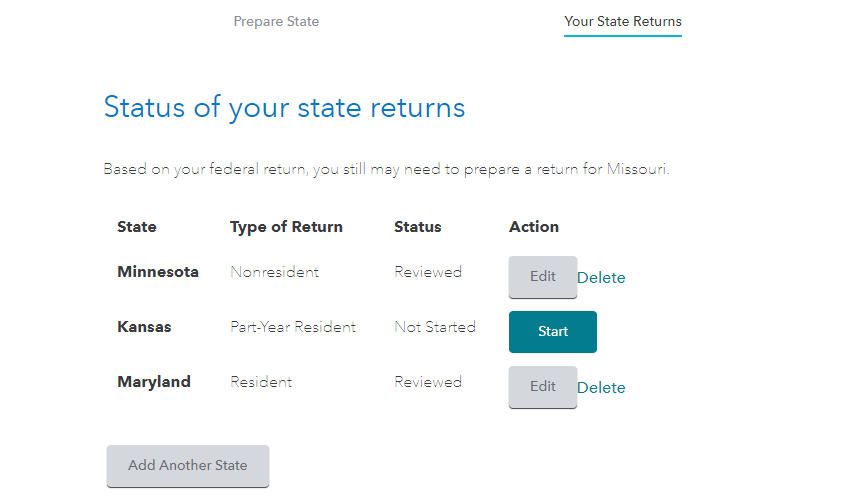
You will then be taken through the state interview section.
Proceed through the screens and answer the questions as prompted. Your entries here will populate your state tax return.
Please comment if you are still having issues seeing and working in your state return after performing the steps above.
**Say "Thanks" by clicking the thumb icon in a post
**Mark the post that answers your question by clicking on "Mark as Best Answer"
**Mark the post that answers your question by clicking on "Mark as Best Answer"
March 8, 2021
10:40 AM
