

- Mark as New
- Bookmark
- Subscribe
- Subscribe to RSS Feed
- Permalink
- Report Inappropriate Content
Get your taxes done using TurboTax
Based on the information you provided, I presume you have two Schedule K-1 forms (one for each LLC, either Form 1065 (partnership) or Form 1120S (S Corp); and a Schedule C (self-employed income) for the lessons.
For each of the Schedule K-1 forms, you should have a "Section 199A Statement or STMT" associated with the box 20 code V (if the LLCs are taxed as partnerships) or box 17 code V (if the LLCs are taxed as S Corps).
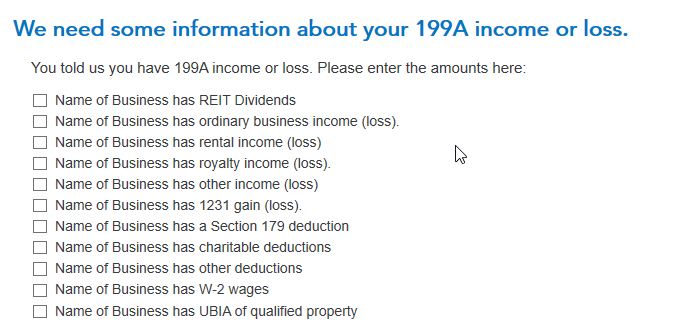
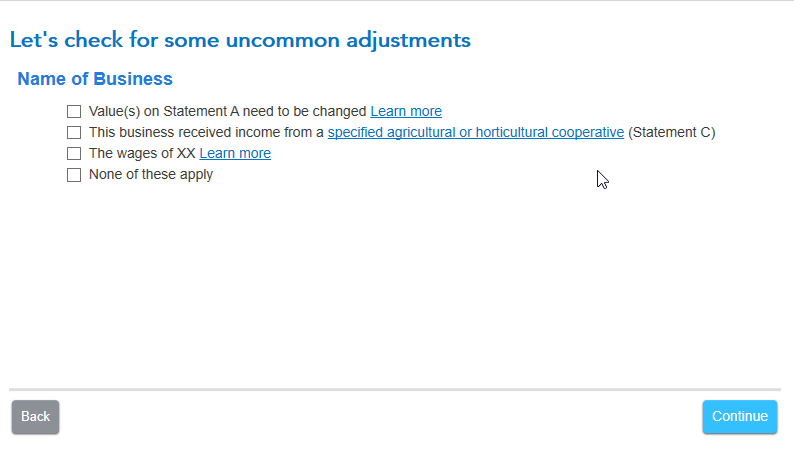
To get the QBI deduction for these two Schedule K-1s, you'll need to enter amounts from that "Section 199A Statement/STMT" on special screens titled "We need some information about your 199A income or loss" and (if applicable) "Let's check for some uncommon adjustments" screens (see two screenshots later in this post).
Enter the code Z or V when you enter the K-1 box 20 or 17 screen, but you don't need to enter an amount. Continue on, and after a couple of screens you'll find the two screens to enter your Statement/STMT amounts. When you check the box next to a category, a place will open up to enter your amounts. These screens (if applicable to the amount(s) on your statement) must be completed in order for your K-1 QBI information to be correctly input into TurboTax.
To get back to the K-1 summary screen and find the Schedule K-1 to edit, click the "magnifying glass Search" icon on the top row, enter "k-1" in the search window and press return or enter, and then click on the "Jump to k-1" link to find the K-1s you need to edit.
Here are the "We need some information about your 199A income or loss" and "Let's check for some uncommon adjustments" screens where you enter the information from your K-1:
**Mark the post that answers your question by clicking on "Mark as Best Answer"
