

- Mark as New
- Bookmark
- Subscribe
- Subscribe to RSS Feed
- Permalink
- Report Inappropriate Content
Get your taxes done using TurboTax
I am sorry, but we do not have access to your TurboTax account here on the Community Board to review your tax return.
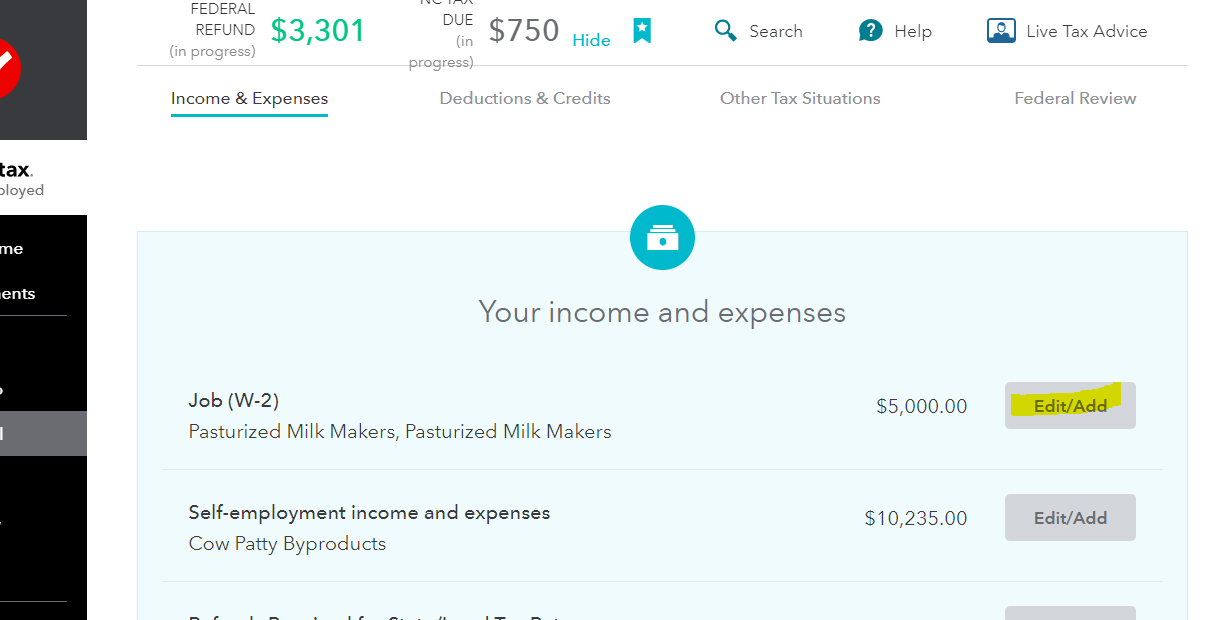
If you are trying to prepare your taxes and are trying to enter your W-2's, here is how you can get started in TurboTax. Open TurboTax with your user name and password.
Fill out each of these sections in TurboTax:
- Personal Info,
- Wages & Income, (To add your W-2 in this section, select Edit/Add next to Job (W-2):
- Deductions & Credits,
- Other Tax Situations,
- State Taxes,
- Review,
- Finish & Pay.
TurboTax is self explanatory through these sections. If you get stuck, reach out on this Board, someone will be happy to help you.
**Say "Thanks" by clicking the thumb icon in a post
**Mark the post that answers your question by clicking on "Mark as Best Answer"
**Mark the post that answers your question by clicking on "Mark as Best Answer"
April 1, 2020
12:43 PM
