

- Mark as New
- Bookmark
- Subscribe
- Subscribe to RSS Feed
- Permalink
- Report Inappropriate Content
Get your taxes done using TurboTax
I'm providing the instructions for entering QBI information reported to you on a K-1, below. But, if that doesn't apply or you have already entered your K-1 correctly, please provide more information about what you see on Form 8995-A versus the QBI Component worksheet. For example, there are limitations on QBI related to your total income if your QBI source is an SSTB (specified services trade or business).
Also, recent updates have resolved many QBI issues. If you are using the TurboTax Premier Download/CD version, use the menu at the top to check for updates (Online>>Check for Updates). TurboTax Online will be updated each time you sign in.
If the source of your QBI income is a K-1, you will have a "box" for your QBI information, provided on a separate statement ("STMT"). If so, there are additional TurboTax screens after the "box" screen where the code is entered. You must enter your box code information on one or more of the applicable screens for the QBI information to "flow" to your QBI Component worksheet. So, after you enter the code, Continue on to find the screens to enter the information.
The screens you need are shown in these screenshots:
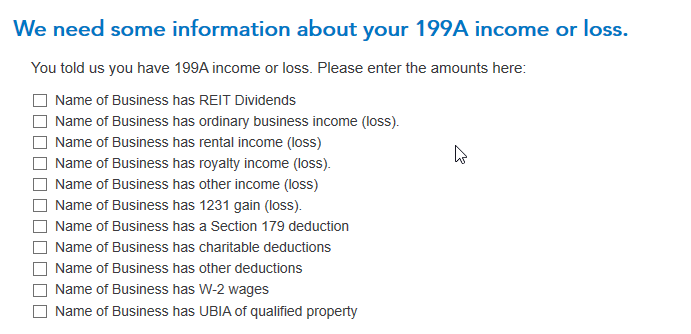

For a partnership Form 1065 Schedule K-1, the Schedule A QBI information is entered into TurboTax as box 20 with a code Z.
For an S-corp Form 1120S Schedule K-1, the Schedule A QBI information is entered into TurboTax as box 17 with a code V.
Form a trust Form 1041 Schedule K-1, the Schedule A QBI information is entered into TurboTax as box 14 with a code of I (as in India
**Mark the post that answers your question by clicking on "Mark as Best Answer"
