

- Mark as New
- Bookmark
- Subscribe
- Subscribe to RSS Feed
- Permalink
- Report Inappropriate Content
Get your taxes done using TurboTax
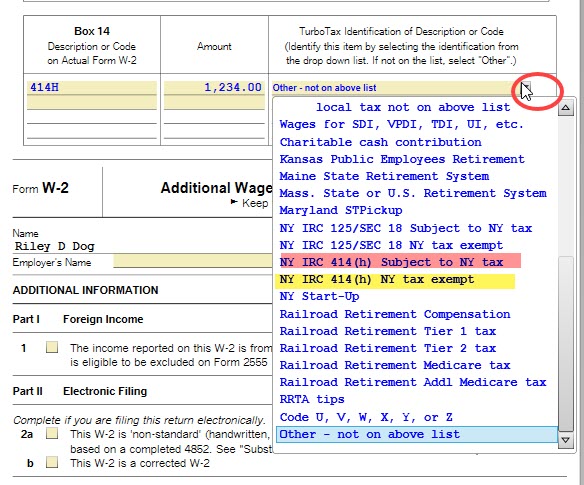
If you are using the CD/Download version of TurboTax, you can indicate whether the 414h entry is taxable by going into Forms Mode. Please follow these steps:
- Go into Forms Mode by clicking on the Forms icon in the top right of the blue bar.
- In the Forms in My Return list on the left, click the W-2 form you want to review. The form will appear on the right side of the screen.
- Scroll down to Box 14. In the box, TurboTax Identification of Description or Code, you can select from the list whether it is taxable or not. (See screenshot below.)
- To return to the interview, click on the Step-By-Step icon in the top right of the blue bar.
March 8, 2020
4:51 PM
