

- Mark as New
- Bookmark
- Subscribe
- Subscribe to RSS Feed
- Permalink
- Report Inappropriate Content
Get your taxes done using TurboTax
If you are using the online version of TurboTax, please see the steps below to enter Box 2a, 3 and 7 of Form 1099-DIV:
- Click on Wages and Income at the top of the screen
- Scroll down to Interest and Dividends and click on Show More
- Click on Start or Revisit next to Dividends on 1099-DIV
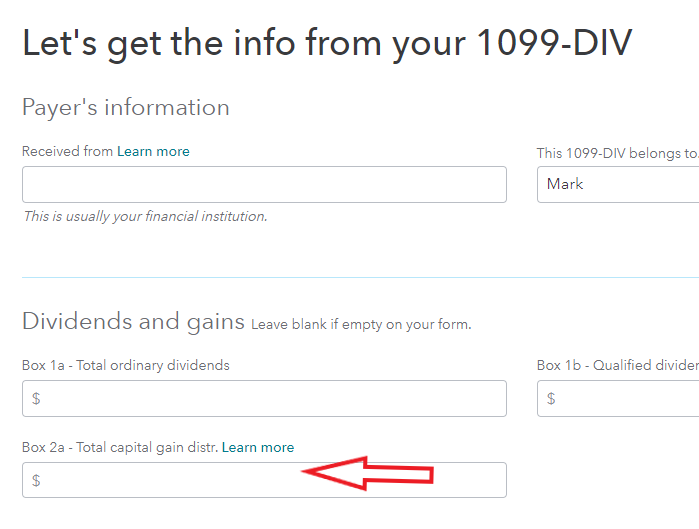
- Select "Add a 1099-Div" or Edit next to your Dividend entries and enter your information. Box 2a for "Capital Gain distributions" is located under the Box 1a, Total Ordinary Dividends. (See screen shot below)
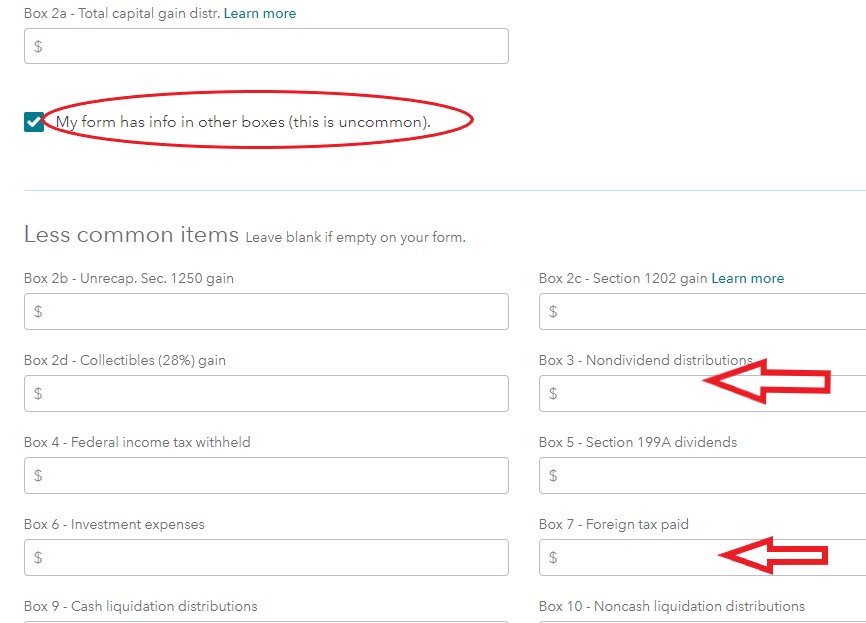
5. Under box 2a check the box for "My form has info in other boxes." This will expand the screen so that Boxes 3 and 7 will be available for your entries. Please see screen shot below.
6. Scroll down and select Continue at the bottom of the page and answer remaining questions.
**Say "Thanks" by clicking the thumb icon in a post
**Mark the post that answers your question by clicking on "Mark as Best Answer"
**Mark the post that answers your question by clicking on "Mark as Best Answer"
February 22, 2020
10:29 AM
