

- Mark as New
- Bookmark
- Subscribe
- Subscribe to RSS Feed
- Permalink
- Report Inappropriate Content
Get your taxes done using TurboTax
UPDATED FOR TAX YEAR 2019
The desktop version of TurboTax offers a What-If Worksheet. It's probably easiest to enter the information on both you and your husband in the return first. Then open the What-If worksheet and delete his information in the next column to get a side-by-side comparison.
You will get error messages if you try to enter your W-2s, etc. as spouse when there is no taxpayer. To open the What-If worksheet, please follow these steps:
- When you are in your return, click on Forms in the upper right of the screen.
- When in Forms mode, click on Open Form in the upper left of the screen.
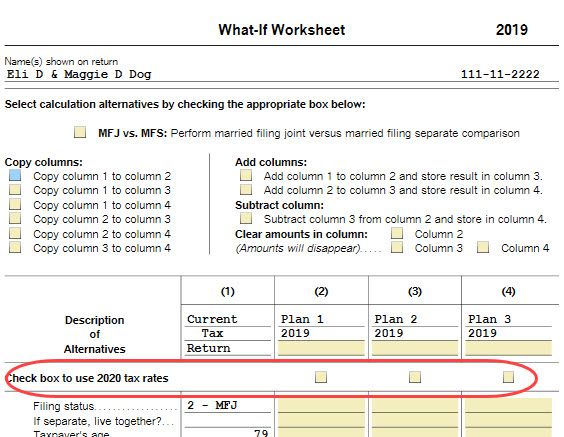
- Type in what-if and double-click on the result to open the worksheet. With the What-If Worksheet open you can use the 2019 tax rates or check the box(es) shown to use the 2020 tax rates for each scenario you will be running. [See screenshot below.]
[Edited | 3/19/2020 | 1:10 pm PDT]
**Say "Thanks" by clicking the thumb icon in a post
**Mark the post that answers your question by clicking on "Mark as Best Answer"
**Mark the post that answers your question by clicking on "Mark as Best Answer"
June 6, 2019
8:27 AM
