

- Mark as New
- Bookmark
- Subscribe
- Subscribe to RSS Feed
- Permalink
- Report Inappropriate Content
Get your taxes done using TurboTax
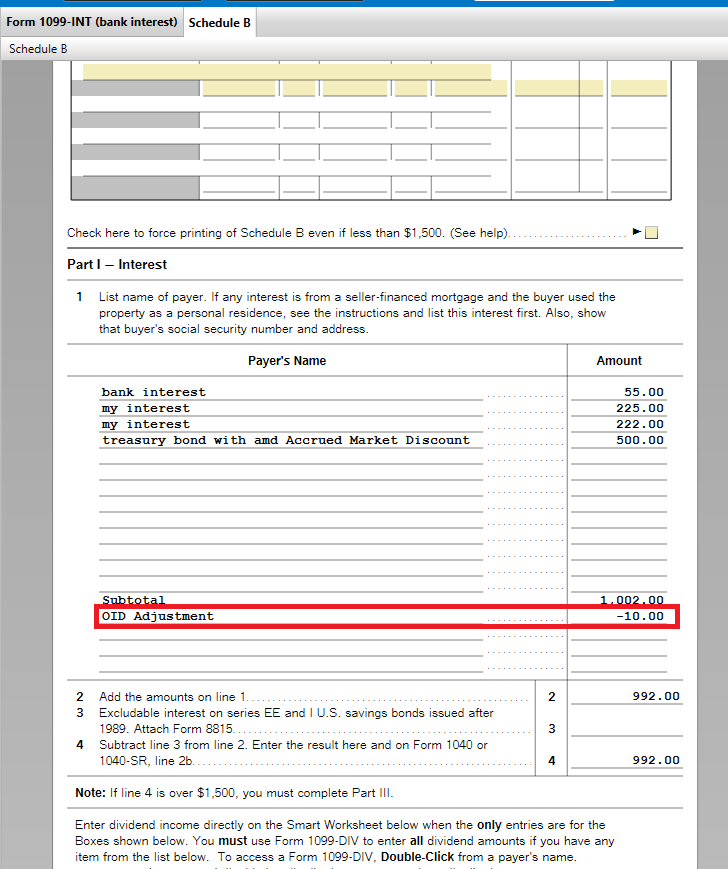
When you enter your 1099-OID as Interest Income, enter the Box 1 amount and check the box 'my form has info in other boxes' and enter the Market Discount Box 10 amount. Continue, and check the box 'I need to adjust the amount of interest...' on the Uncommon Situations screen. Continue, and on the Tell Us About Your Adjustment screen, enter the Box 10 amount and choose 'This is an original issue discount' from the dropdown for 'Reason for Adjustment.'
You'll see the Box 1 and Box 10 (adjustment) on both the 1099-INT Worksheet and Schedule B. You'll report the accrued Market Discount as interest when you sell the bond and receive a 1099-B.
**Say "Thanks" by clicking the thumb icon in a post
**Mark the post that answers your question by clicking on "Mark as Best Answer"
**Mark the post that answers your question by clicking on "Mark as Best Answer"
Friday
110 Views
