

- Mark as New
- Bookmark
- Subscribe
- Subscribe to RSS Feed
- Permalink
- Report Inappropriate Content
Get your taxes done using TurboTax
Don't use that section for a 1099-misc; you won't be asked about tax withheld there. Use the instructions below to report your 1099-misc that is not for self-employment. If the income is self-employment, it belongs on Schedule C. Keep detailed records with your tax paperwork.
If the income on the 1099-misc is not self-employment income, delete (see instructions below) that 1099-misc and delete the Schedule C. Then re-enter the 1099-misc as follows.
Under Other Common Income, select Start or Revisit next to Form 1099-MISC. Enter your 1099-MISC info on the Let's get the info from your 1099-MISC screen and click Continue. Put a checkmark in the box that says My form has other info in boxes 1-18, so you can enter the withholding.
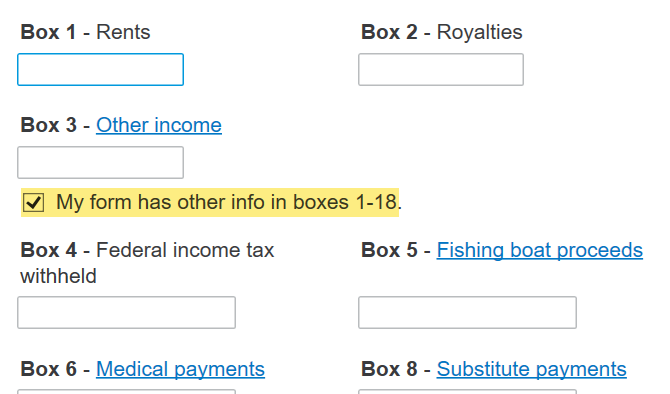
- On the Describe the reason for this 1099-MISC screen, enter a description of the income.
- Click Continue.
- Select None of these apply on the Does one of these uncommon situations apply? screen.
- Select No, it didn’t involve work like my main job on the Did the involve work that's like your main job? screen.
- Select I got it only in 2024 on the How often did you get income for? screen.
- Select No, it didn’t involve intent to earn money on the Did the work involve an intent to earn money? screen.
- Select No on the Do you have another 1099-MISC? screen.
Answering differently to any of these questions will imply self-employment and generate Schedule C. Don't forget to delete the Sched C and the erroneous 1099.
How to delete forms in TurboTax Online
How to delete forms in TurboTax Desktop
**Mark the post that answers your question by clicking on "Mark as Best Answer"
