

- Mark as New
- Bookmark
- Subscribe
- Subscribe to RSS Feed
- Permalink
- Report Inappropriate Content
Get your taxes done using TurboTax
You can enter your 1099-DIV information using the instructions below. You can also enter Form 1099-DIV using these instructions. You will need to select "Add Investments."
For TurboTax Desktop:
- Open/continue your return
- Click on "Search"
- And in the search bar type"1099-DIV"
- Select "Jump to 1099-DIV"
- It'll take you to a screen that shows your Form(s) 1099-DIV that you have entered.
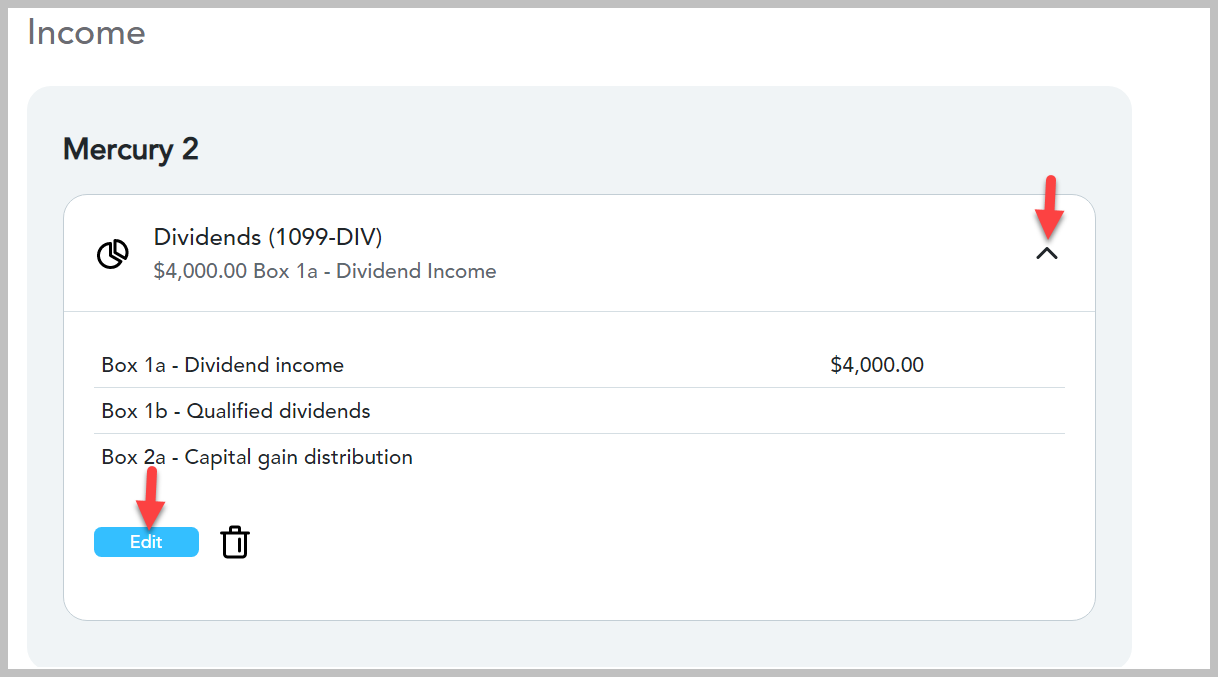
- Next to the Form 1099-DIV you want to edit, click on the (down-facing) caret
- Click on the "Edit"
- Make sure the box is checked for "My form has info in other boxes" if your entries involve these boxes.
- Make your edits
For TurboTax Online:
- Open/continue your return
- Click on magnifying glass for Search in the top right of your screen
- And in the search bar type"1099-DIV"
- Select "Jump to 1099-DIV"
- It will take you to a screen that shows your Form(s) 1099-DIV that you have entered.
- Next to the Form 1099-DIV you want to edit, click on the (down-facing) caret
- Click on the "Edit"
- Make sure the box is checked for "My form has info in other boxes" if your entries involve these boxes
- Make your edits
Your screens will look something like this:
To search for your 1099-DIV entry screens

Select the Form 1099-DIV that you want to edit:
Select the box that says "My form has info in other boxes" if you have entries in these boxes

Click here for "Where Do I Enter Form 1099-DIV in TurboTax Online?"
Click here for "What is IRS Form 1099-DIV"
**Say "Thanks" by clicking the thumb icon in a post
**Mark the post that answers your question by clicking on "Mark as Best Answer"
**Mark the post that answers your question by clicking on "Mark as Best Answer"
March 2, 2025
4:10 PM
