

- Mark as New
- Bookmark
- Subscribe
- Subscribe to RSS Feed
- Permalink
- Report Inappropriate Content
Get your taxes done using TurboTax
Yes, you have to file it. If you worked as a freelancer or contractor last year, you get a 1099-NEC reporting how much money you were paid in box 1. To enter your Form 1099-NEC in TurboTax:
- Sign in and open or continue your return.
- Search for 1099-NEC and select the Jump to link.
- Answer the questions and continue through to enter the information from your form.
- If you have multiple 1099-NECs to enter, you can select +Add Another 1099-NEC on the 1099-NEC Summary screen.
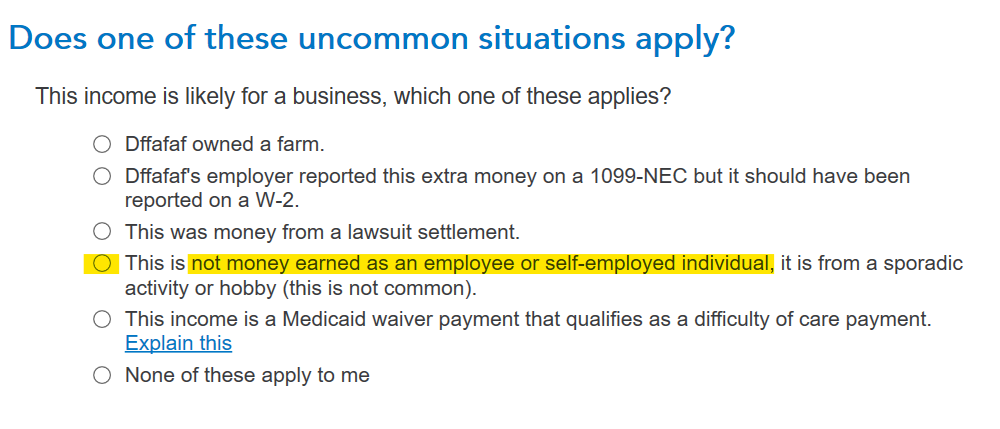
When you’re done, we’ll ask you a few questions and help you through entering any expenses you may have so that you can reduce your taxable income. TurboTax will assume this is self-employment income and generate a Schedule C. After you enter it, there is a screen that asks about uncommon situations that apply. If this is not self-employment income, you will need to indicate that on that screen. Am I self-employed?
**Say "Thanks" by clicking the thumb icon in a post
**Mark the post that answers your question by clicking on "Mark as Best Answer"
**Mark the post that answers your question by clicking on "Mark as Best Answer"
March 20, 2024
1:08 PM
