

- Mark as New
- Bookmark
- Subscribe
- Subscribe to RSS Feed
- Permalink
- Report Inappropriate Content
Get your taxes done using TurboTax
Please use these steps to view your 1040 tax return.
You can preview your tax return by going to:
- On the menu bar on the left that shows.
- Select Tax Tools
- On the drop-down select Tools
- On the popup menu
- Select View Tax Summary
- On the left sidebar
- Select Preview my 1040.
- Schedules 1,2&3 are included if you scroll down past your 1040.
- To return to the entry screens press Back on the sidebar.
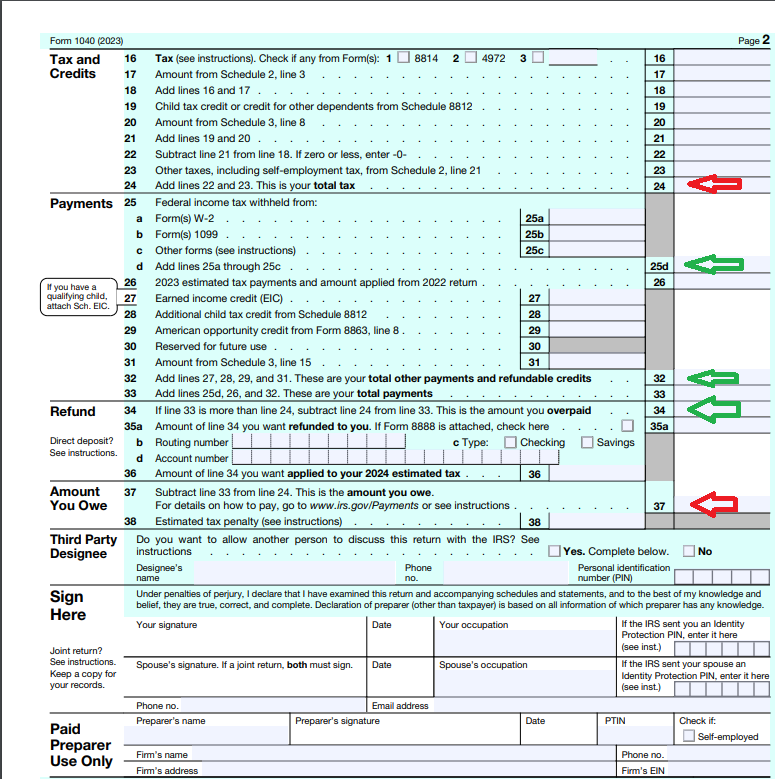
Some key numbers on your 1040 tax return are:
Line 15 - Taxable Income
Line 24 - Total Tax.
Line 25 d - Withholdings.
Line 26 - Estimated tax payments
Line 33 - Payments including Credits.
Line 34 - Overpayments.
Line 37 - Tax owed.
**Say "Thanks" by clicking the thumb icon in a post
**Mark the post that answers your question by clicking on "Mark as Best Answer"
**Mark the post that answers your question by clicking on "Mark as Best Answer"
February 20, 2024
6:24 AM
