

- Mark as New
- Bookmark
- Subscribe
- Subscribe to RSS Feed
- Permalink
- Report Inappropriate Content
Get your taxes done using TurboTax
Yes, you would file a return in both states.
If you’re a New Jersey resident and work in New York State, you’ll need to file a New Jersey resident return and a New York State nonresident return. Your New York income will be entered on your New York state tax return. If you owe New York state taxes, it'll be calculated by TurboTax and you will follow the prompts for paying any tax owed when filing your return.
To help ensure accurate calculations, always complete the nonresident return first if filing in multiple states because your resident state will give you a credit for any taxes paid in your nonresident state.
Once you've determined that you need to file a nonresident state return, the first thing you want to do is make sure you've filled out the Personal Info section correctly:
- With your return open, select My Info in the left-hand menu.
- Then, on the Personal info summary screen, scroll down to Other State Income, and select Edit.
- At the Did you make any money in any other states? Question, answer Yes and make sure your nonresident state(s) are selected from the dropdown.
- Select Continue to return to your Personal info summary
In general, New Jersey and New York state both require that married couples use the same filing status for their New Jersey and New York state tax returns, as they used for their federal return.
After you finish your federal return, you'll automatically be moved to the State tab, where you'll see your nonresident state(s) listed in addition to your resident state.
Although it appears that you may be paying tax on your income twice because New Jersey requires you to pay taxes on all of your income, regardless of where it's earned, and New York collects taxes on the income you earned while working in the state, this income won’t be double-taxed because New Jersey gives you a tax credit for taxes paid to other jurisdictions.
This credit reduces your New Jersey Income Tax liability so that you don't pay taxes twice on the same income.
However, this isn’t a dollar-for-dollar refund of the taxes you paid to New York. Per the State of New Jersey, your credit can't be more than the amount you would’ve paid if you earned the income in New Jersey (rather than New York).
Additionally, New York isn't taxing your overall adjusted gross income. NY uses your total income to set the base tax rate.
You then pay tax on the NY percentage of what the total tax would have been if all you income was NY income.
For example, if you earned $100,000 total and $30,000 in NY, your tax rate would be based on $100,000. Say the NY tax on $100,000 is $10,000. Then your tax would be 30% ($30,000/$100,000) of $10,000 or $3,000.
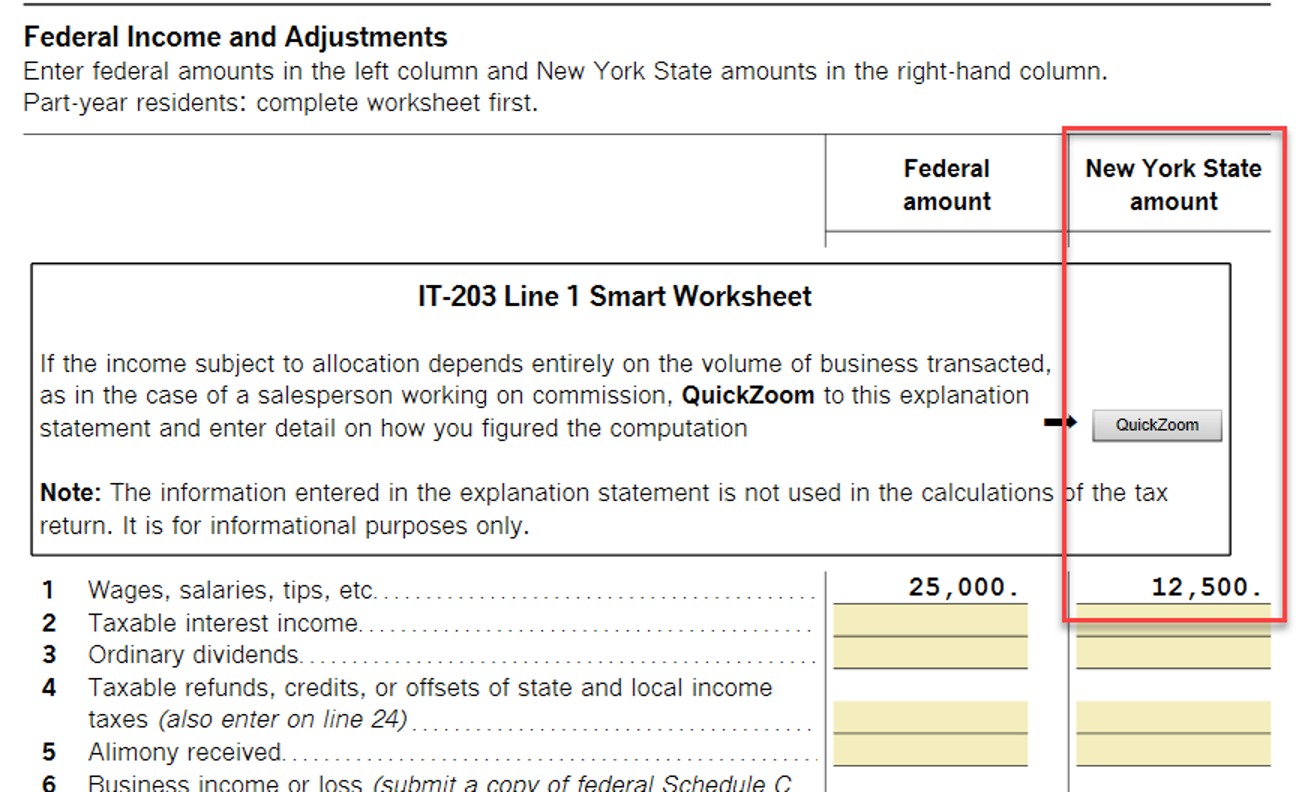
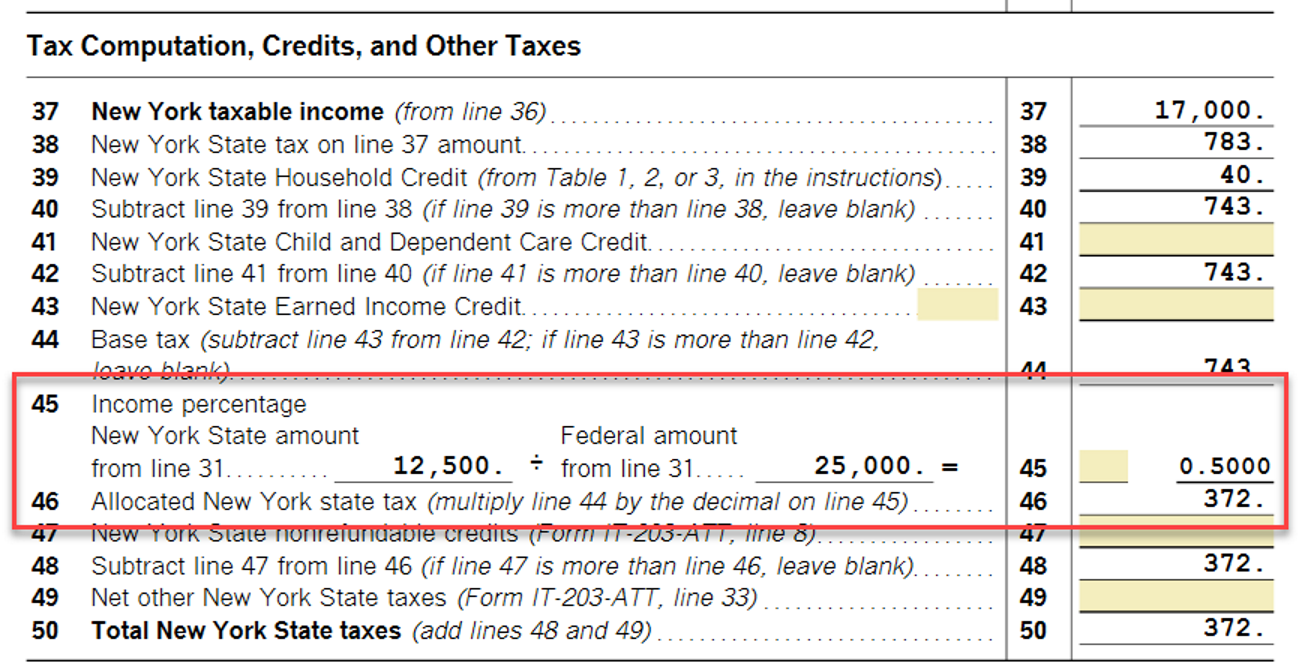
You can preview your NY Tax summary to see what portion of the total taxes for NY you are paying
To preview NY Tax Summary:
- Sign in to your TurboTax account.
- Open or continue your return.
- Select Tax Tools from the menu (if you don't see this, select the menu icon in the upper-left corner).
- With the Tax Tools menu open, you can then:
- Preview your entire return: Select Print Center and then Print, save or preview this year's return (you may be asked to register or pay first).
- View only your New York state return: Select Tools. Next, select View NY Tax Summary.
Click here for additional information on filing when multiple states are involved.
Click here for information on how to file a nonresident state return.
Click here for additional information on filing status for New Jersey state tax returns.
Click here for additional information on filing status requirements in New York state.
**Mark the post that answers your question by clicking on "Mark as Best Answer"
