

- Mark as New
- Bookmark
- Subscribe
- Subscribe to RSS Feed
- Permalink
- Report Inappropriate Content
Get your taxes done using TurboTax
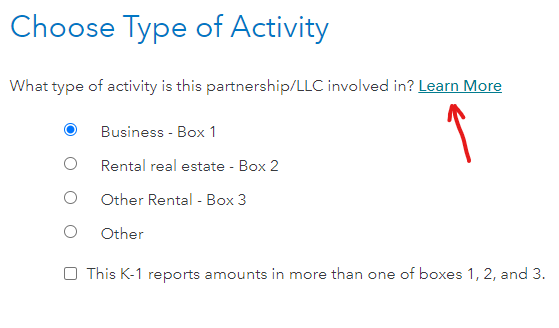
I assume that you entered all the real estate activity on one K-1 entry. Learn more at the screen Choose Type of Activity states:
Note
If your K-1 shows more than one type of activity, treat each one separately. Enter all business items on one K-1, all real estate rental items on another K-1, and all other rental items on a third K-1.
If you entered the total of all of the real estate activities under Box 2 at the Screen Choose Type of Activity, enter the total of the net rental real estate income / (loss), W-2 wages and qualified property at the screen We need some information about your 199A income.
- At the screen Enter Box 20 Info, select Z-Section 199A information. Leave Amount empty. This tells the software that Section 199A information will need to be entered for the income previously reported. Click Continue.
- At the screen We see you have Section 199A income, select the appropriate income description. Click How would I know this? for more information.
- At the screen We need some information about your 199A income, select the appropriate income description and amount from the 199A detail provided with the K-1. Click Continue.
**Say "Thanks" by clicking the thumb icon in a post
**Mark the post that answers your question by clicking on "Mark as Best Answer"
**Mark the post that answers your question by clicking on "Mark as Best Answer"
April 5, 2023
3:42 PM
