
- Mark as New
- Bookmark
- Subscribe
- Subscribe to RSS Feed
- Permalink
- Report Inappropriate Content
Needs Review
After entering my medical expenses, TT says medical expense “Needs Review.” I’ve deleted the zeros, emptied the cookies and cache, deleted return and reentered all numbers …. Still the same problem. Please help.


- Mark as New
- Bookmark
- Subscribe
- Subscribe to RSS Feed
- Permalink
- Report Inappropriate Content
Get your taxes done using TurboTax
Are you taking the standard deduction? Medical expenses are an itemized deduction. If you don't have more itemized deductions than your standard deduction, they don't affect your tax return. Preview your 1040 and look on line 12 to see if the amount is the standard deduction. If you are taking the standard deduction (not itemizing), you can ignore it; it won't prevent e-filing.
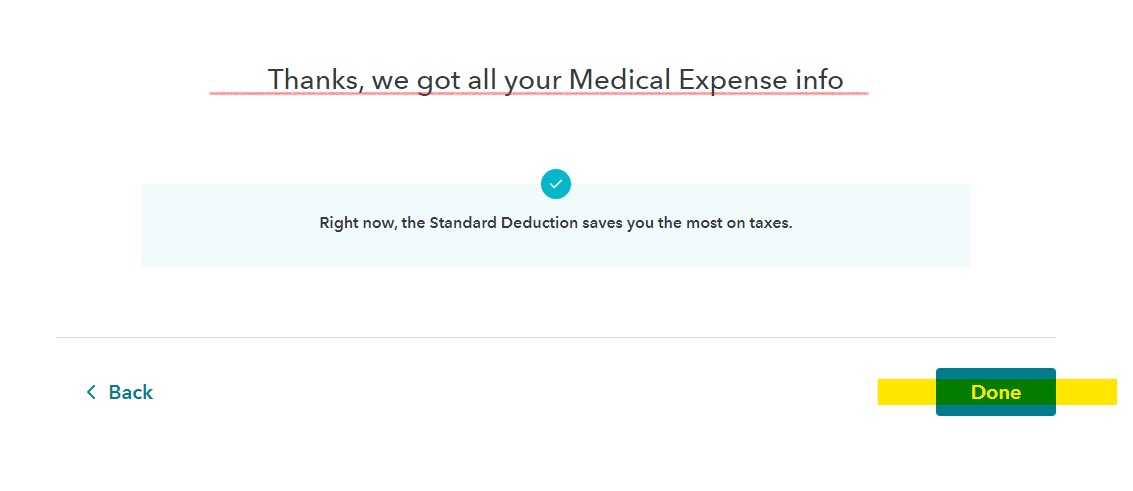
Once you clicked through all 11 medical expense categories, you should get a message that says either ''You are getting a medical deduction tax break'' OR ''The standard deduction is right for you''. Once you click on DONE at the bottom of that screen, the ''Needs Review'' message should go away and the summary should show the total of what you entered in that section.
**Mark the post that answers your question by clicking on "Mark as Best Answer"
- Mark as New
- Bookmark
- Subscribe
- Subscribe to RSS Feed
- Permalink
- Report Inappropriate Content
Get your taxes done using TurboTax
I’m itemizing. I’ve checked everything multiple times. Seems like there is a bug in the system. Thanks for reaching out.

- Mark as New
- Bookmark
- Subscribe
- Subscribe to RSS Feed
- Permalink
- Report Inappropriate Content
Get your taxes done using TurboTax
Your Medical Expenses Worksheet may be hanging up on something. You can delete the worksheet and re-enter your medical expenses and you should be able to proceed.
To delete a specific form in TurboTax Online you can follow these steps:
- Within your return, click on Tax Tools in the black menu on the left side of the screen.
- Click on Tools.
- Click on Delete a Form.
- Scroll down to your Medical Expenses Worksheet and click Delete.
- Under Federal in the black menu bar click Deductions & Credits to get back into your tax returns.
- Scroll down to Medical Expenses and re-enter your information.
- Proceed entering/reviewing your return.
To do this in TurboTax Desktop you can follow these steps:
- Within your return, click on the Forms icon in the upper right of the screen to switch to Forms mode.
- Scroll down in the menu bar on the left and select your Medical Expenses Worksheet.
- Click the Delete Form button at the bottom left of the preview screen.
- Confirm the deletion then click the Step-by-Step icon in the upper right of the screen.
- Click on the Federal Taxes tab and Deductions & Credits and I'll choose what I work on.
- Scroll down to Medical Expenses and Start or Update and re-enter your information.
- Proceed entering/reviewing your return.
**Mark the post that answers your question by clicking on "Mark as Best Answer"
