

- Mark as New
- Bookmark
- Subscribe
- Subscribe to RSS Feed
- Permalink
- Report Inappropriate Content
Get your taxes done using TurboTax
IRS form 1099-K reporting Personal item sales should not link to Schedule C. You may want to delete that entry and start over.
You are able to remove the IRS form 1099-K by:
- Down the left side of the screen, click on Tax Tools.
- Click on Tools.
- Click on Delete a form.
- Find the form listed and click Delete to the right.
To report Personal item sales, follow these directions.
- Down the left side of the screen, click Federal.
- Down the left side of the screen, click Wages & Income.
- Click Show more to the right of Other Common Income.
- Under Your income and expenses, click the Edit/Add button to the right of Form 1099-K.
- At the screen Did you get a 1099-K? click Yes.
- At the screen How would you like to enter your 1099-K? click Type it in myself. Click Continue.
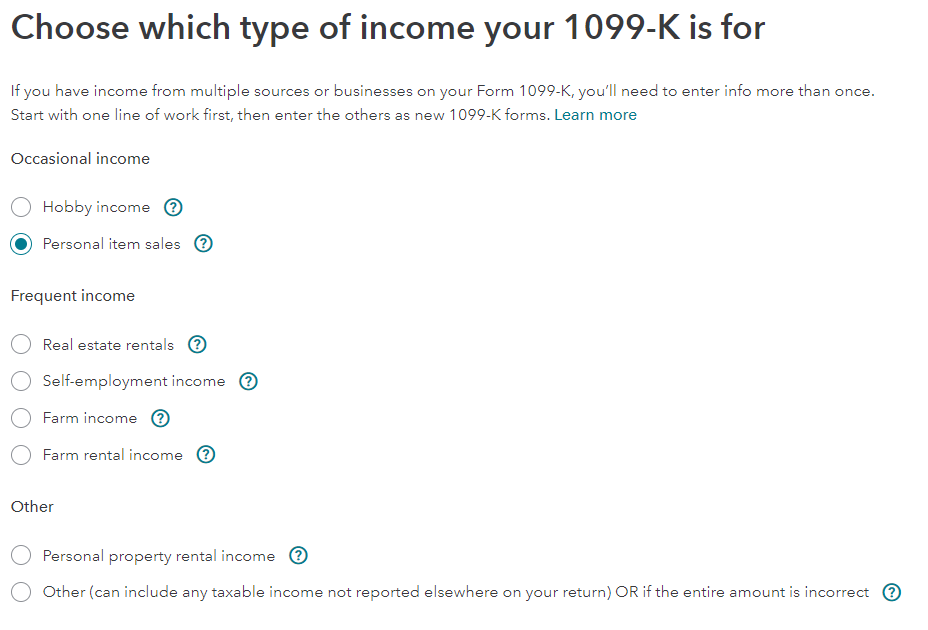
- At the screen Choose which type of income your 1099-K is for, select the button for Personal item sales. Click Continue.
- At the screen Let’s get the info from your 1099-K, enter the information. Click Continue.
- At the screen Personal Item Sales, you are told that further information will need to be entered. Learn More provides detailed information for the next steps. Click Continue.
- At the screen Your 1099-K summary, notice that the income relates to ‘Sale of Personal Items’. Click Done.
- Under Your income and expenses, click the Edit/Add button to the right of Investments and Savings (1099-B, 1099-K….)
- At this screen, you will be asked to Review the Personal item sales (1099-K).
At the screen Now, enter one sale…., answer questions about the personal item sale. Click Continue.
A version higher than TurboTax Deluxe Online may be required.
The entry will be reported:
- on Schedule D of the Federal 1040 tax return, and
- on line 7 of the Federal 1040 tax return.
Capital loss for a personal item sale reports $0 capital gain on line 7 of the Federal 1040 tax return.
**Say "Thanks" by clicking the thumb icon in a post
**Mark the post that answers your question by clicking on "Mark as Best Answer"
**Mark the post that answers your question by clicking on "Mark as Best Answer"
February 16, 2023
5:57 AM
326 Views
