
- Mark as New
- Bookmark
- Subscribe
- Subscribe to RSS Feed
- Permalink
- Report Inappropriate Content
Get your taxes done using TurboTax
I apologize for the inconvenience. Please follow these steps:
- Open or return to TurboTax.
- In TurboTax, search for “1099-B” and then select the “Jump to” link in the search results.
- If you see Your investments and savings, select the sale, edit and click the pencil to edit.
- Select the title in the Sales Section.
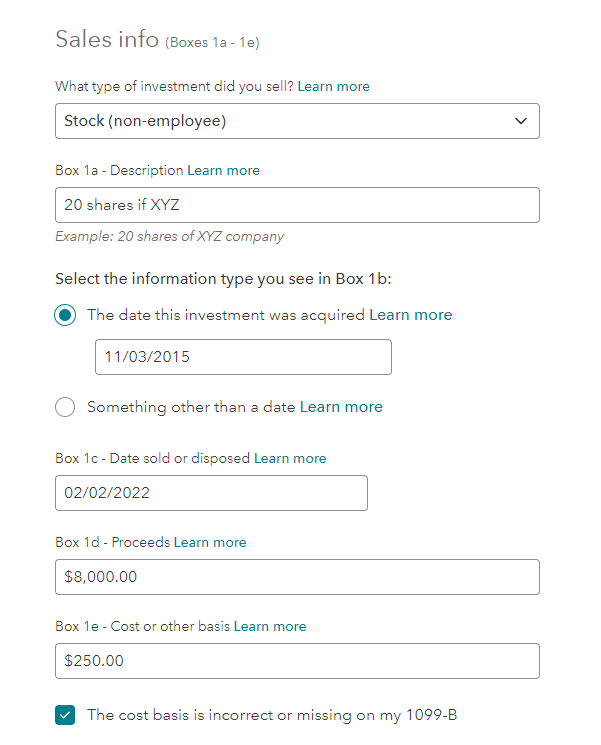
- Select the type of investment.
- Enter a description in Box 1a.
- Enter the date you acquired the investment in Box1b.
- Box 1c enter the date sold.
- Enter the proceeds in Box1d.
- For Box 1e, enter the correct cost basis
- Put a check in “The cost basis is incorrect or missing.”
- Continue.
- Select if any of the situations apply to this sale
- Continue.
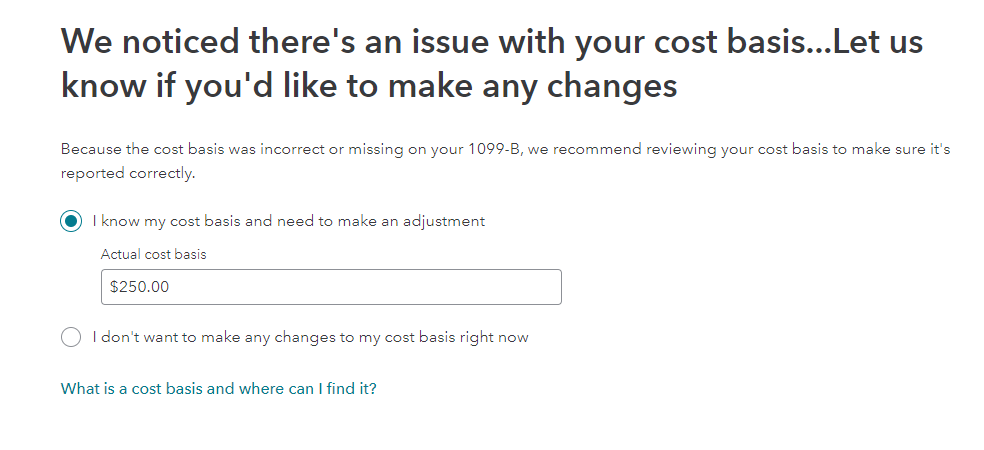
- Select “I know my cost basis and enter the actual cost.
- Continue and you will return to the Review screen.
**Say "Thanks" by clicking the thumb icon in a post
**Mark the post that answers your question by clicking on "Mark as Best Answer"
**Mark the post that answers your question by clicking on "Mark as Best Answer"
February 14, 2023
8:50 AM
