turbotax icon
cancel
Showing results for 
Search instead for 
Did you mean: 
Announcements
Close icon
Do you have a TurboTax Online account?

We'll help you get started or pick up where you left off.

LRDeRouen
New Member

How do I remove an item from the 1099-B proceeds from Broker sales. I entered the same item twice and cant figure out how to remove one?

ihave turbotax premier. I have entered the item Short term covered securities on the form twice. how can i remove one of them ?
x
Do you have an Intuit account?

Do you have an Intuit account?

You'll need to sign in or create an account to connect with an expert.

3 Replies
ThomasM125
Expert Alumni

How do I remove an item from the 1099-B proceeds from Broker sales. I entered the same item twice and cant figure out how to remove one?

You will have to edit your investment sales in TurboTax to find the errant entry and delete it. You can use these menu tabs in TurboTax to find the duplicate investment sale entry:

  1. Income and expenses
  2. Investment income
  3. Stocks, Mutual Funds, Bonds, Other

You should see a list of your investment sales and an Edit box next to each one that you will click on to see the entry and make changes.

**Say "Thanks" by clicking the thumb icon in a post
**Mark the post that answers your question by clicking on "Mark as Best Answer"
mseibold1
Returning Member

How do I remove an item from the 1099-B proceeds from Broker sales. I entered the same item twice and cant figure out how to remove one?

I did the edit thing but it only lets you make changes to that entry.  It does not let you delete the entry.  How do I delete that one entry?  or I would be glad to delete all of them and start over.  However it won't let me.  what do you recommend.  Thanks

JamesG1
Expert Alumni

How do I remove an item from the 1099-B proceeds from Broker sales. I entered the same item twice and cant figure out how to remove one?

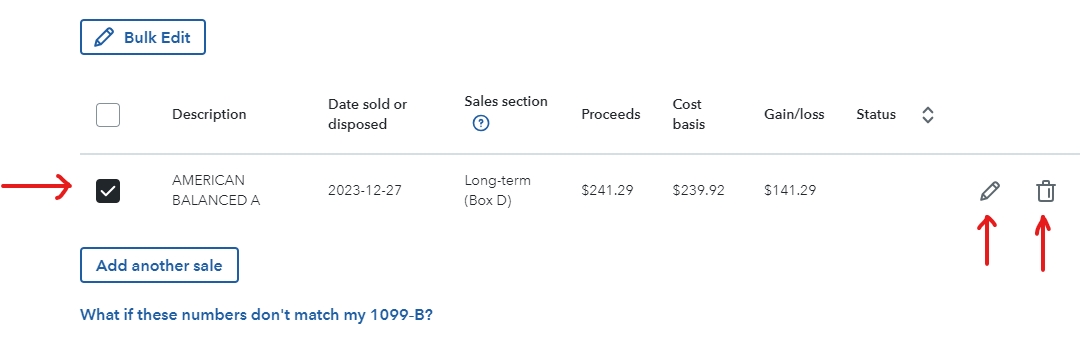
In TurboTax Online, you will find two options to edit the entries downloaded from your broker and one option to delete the entry.


The delete trashcan to the right will remove the entry.  In some cases, you may have to adjust a bar across the bottom of the screen to see the icon.


The pencil to the right may be used to edit information in the transaction.


Click the box to the left and the Bulk Edit function is invoked.  This will allow you to edit multiple entries at the same time.

**Say "Thanks" by clicking the thumb icon in a post
**Mark the post that answers your question by clicking on "Mark as Best Answer"

Unlock tailored help options in your account.

message box icon

Get more help

Ask questions and learn more about your taxes and finances.

Post your Question