turbotax icon
cancel
Showing results for 
Search instead for 
Did you mean: 
Announcements
Close icon
Do you have a TurboTax Online account?

We'll help you get started or pick up where you left off.

I am having an issue filing my 2024 tax return. When using form 1116 to offset foreign taxes, the program does not show a credit (FTC = 0), Why?

although I successfully used this credit for foreign taxes paid last year. why is the tax credit not being taken into account this year? I also need to make sure that the balance of the $9 carried forward to 2024 was accounted for correctly.
x
Do you have an Intuit account?

Do you have an Intuit account?

You'll need to sign in or create an account to connect with an expert.

1 Best answer

Accepted Solutions
ThomasM125
Expert Alumni

I am having an issue filing my 2024 tax return. When using form 1116 to offset foreign taxes, the program does not show a credit (FTC = 0), Why?

If you mean you had a foreign tax credit (FTC) carryover from 2023 to 2024, one reason you wouldn't get the credit in 2024 would be that you didn't have any foreign income in 2024. You can't use the credit in any year you don't have foreign income.


If you mean you paid foreign taxes in 2024, then you likely had foreign income in that year, but you may not have identified it properly in the program. For instance, after you enter a Form 1099-INT in TurboTax reporting foreign taxes in box 6, you need to then enter for foreign income that generated the tax on the screen that says Tell us about your foreign interest:
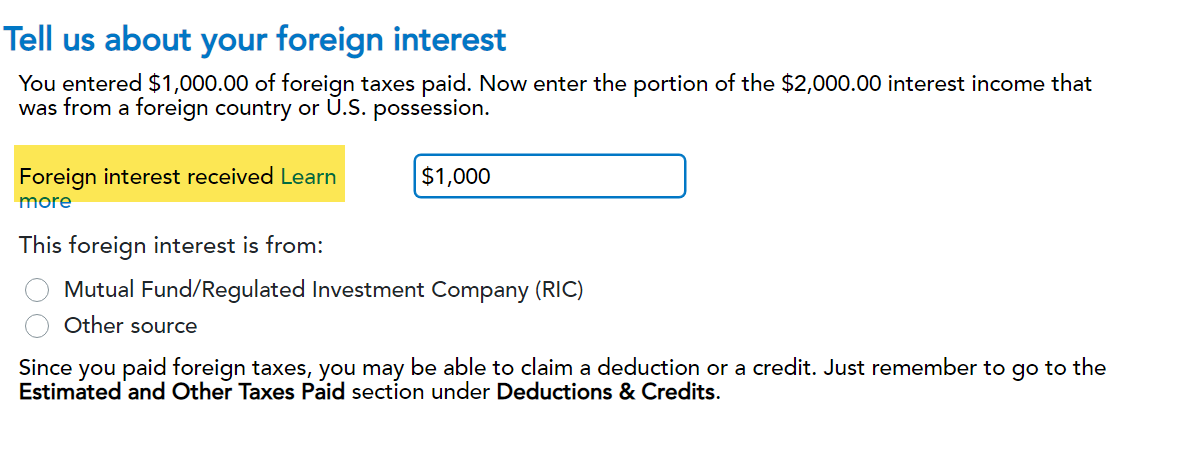
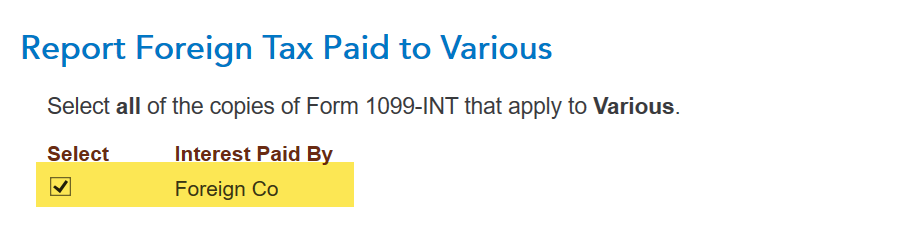
Also, when you go to the foreign tax credit section in the Deductions and Credits area of TurboTax, you need to link the income statement that reported the foreign taxes to the credit worksheet on the screen that says Report Foreign Tax Paid to (name of country):


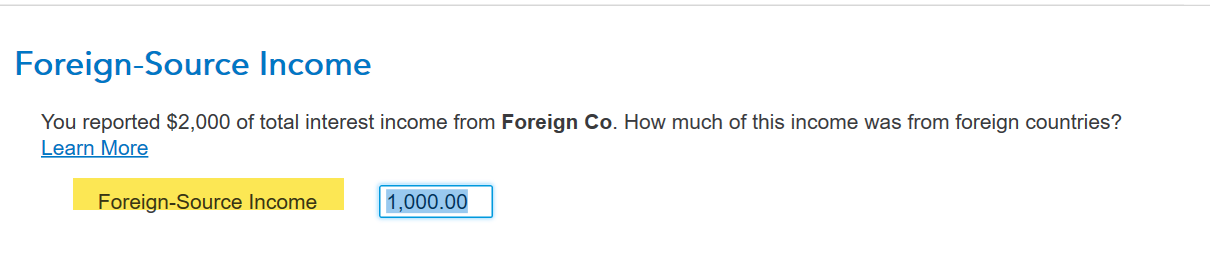
And once again make sure the correct foreign income is entered on the screen that says Foreign-Source Income:
 

It is also possible that you don't have sufficient taxable income to use the foreign tax credit. You can look at your Form 1040 on line 24 less the credits on lines 27 to 29 to see if you have any tax left to apply the FTC to.


To view your form 1040 and schedule 1 to 3:


  1. Choose Tax Tools from your left menu bar in TurboTax Online while working in your program
  2. Choose Tools
  3. Choose View Tax Summary
  4. See the Preview my 1040 option in the left menu bar and click on it
  5. Choose the Back option in the left menu bar when you are done 

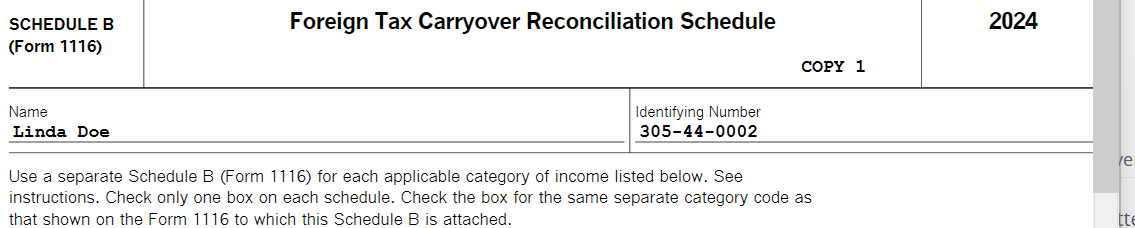
For the $9 carryover, you should see that listed on the Foreign Tax Credit Carryover worksheet when you work through the FTC credit section. You will see it accounted for on the Foreign Tax Carryover Reconciliation Schedule when you complete your return and print out your forms and worksheets.


**Say "Thanks" by clicking the thumb icon in a post
**Mark the post that answers your question by clicking on "Mark as Best Answer"

View solution in original post

2 Replies
ThomasM125
Expert Alumni

I am having an issue filing my 2024 tax return. When using form 1116 to offset foreign taxes, the program does not show a credit (FTC = 0), Why?

If you mean you had a foreign tax credit (FTC) carryover from 2023 to 2024, one reason you wouldn't get the credit in 2024 would be that you didn't have any foreign income in 2024. You can't use the credit in any year you don't have foreign income.


If you mean you paid foreign taxes in 2024, then you likely had foreign income in that year, but you may not have identified it properly in the program. For instance, after you enter a Form 1099-INT in TurboTax reporting foreign taxes in box 6, you need to then enter for foreign income that generated the tax on the screen that says Tell us about your foreign interest:

Also, when you go to the foreign tax credit section in the Deductions and Credits area of TurboTax, you need to link the income statement that reported the foreign taxes to the credit worksheet on the screen that says Report Foreign Tax Paid to (name of country):


And once again make sure the correct foreign income is entered on the screen that says Foreign-Source Income:


It is also possible that you don't have sufficient taxable income to use the foreign tax credit. You can look at your Form 1040 on line 24 less the credits on lines 27 to 29 to see if you have any tax left to apply the FTC to.


To view your form 1040 and schedule 1 to 3:


  1. Choose Tax Tools from your left menu bar in TurboTax Online while working in your program
  2. Choose Tools
  3. Choose View Tax Summary
  4. See the Preview my 1040 option in the left menu bar and click on it
  5. Choose the Back option in the left menu bar when you are done 

For the $9 carryover, you should see that listed on the Foreign Tax Credit Carryover worksheet when you work through the FTC credit section. You will see it accounted for on the Foreign Tax Carryover Reconciliation Schedule when you complete your return and print out your forms and worksheets.


**Say "Thanks" by clicking the thumb icon in a post
**Mark the post that answers your question by clicking on "Mark as Best Answer"

I am having an issue filing my 2024 tax return. When using form 1116 to offset foreign taxes, the program does not show a credit (FTC = 0), Why?

Hello! Thank you for your good answer! I hope I am not mistaken, and I give credit, the FTC offset did not occur because the amount of foreign taxes paid is much higher than the tax liability in the USA. I will transfer the taxes paid to the next year or return them to the business expense part. It is currently not possible to use the tools in the program and print charts to check Form 1116, because you first need to pay the TurboTax fee, then apparently you can use the tools function.

Unlock tailored help options in your account.

message box icon

Get more help

Ask questions and learn more about your taxes and finances.

Post your Question
