


- Community
- Topics
Turn on suggestions
Auto-suggest helps you quickly narrow down your search results by suggesting possible matches as you type.
Showing results for
- Community
- :
- Discussions
- :
- Taxes
- :
- After you file
- :
- Re: How do I download last year's tax returns??? The stupid home page takes me to file this year's return, and their is no Document button on the left.
Announcements


- Mark as New
- Bookmark
- Subscribe
- Subscribe to RSS Feed
- Permalink
- Report Inappropriate Content
How do I download last year's tax returns??? The stupid home page takes me to file this year's return, and their is no Document button on the left.
Can't download last year's tax return. The home page is keeps forcing me to file 2020 tax returns.
You can search for download 2019 returns but it downloads one page with just my name on it.
You can search for download 2019 returns but it downloads one page with just my name on it.
Topics:
posted
December 12, 2020
9:36 AM
last updated
December 12, 2020
9:36 AM
Connect with an expert

Do you have an Intuit account?
You'll need to sign in or create an account to connect with an expert.
9 Replies


- Mark as New
- Bookmark
- Subscribe
- Subscribe to RSS Feed
- Permalink
- Report Inappropriate Content
How do I download last year's tax returns??? The stupid home page takes me to file this year's return, and their is no Document button on the left.
To access your current or prior year online tax returns sign onto the TurboTax website with the User ID you used to create the account - https://myturbotax.intuit.com/
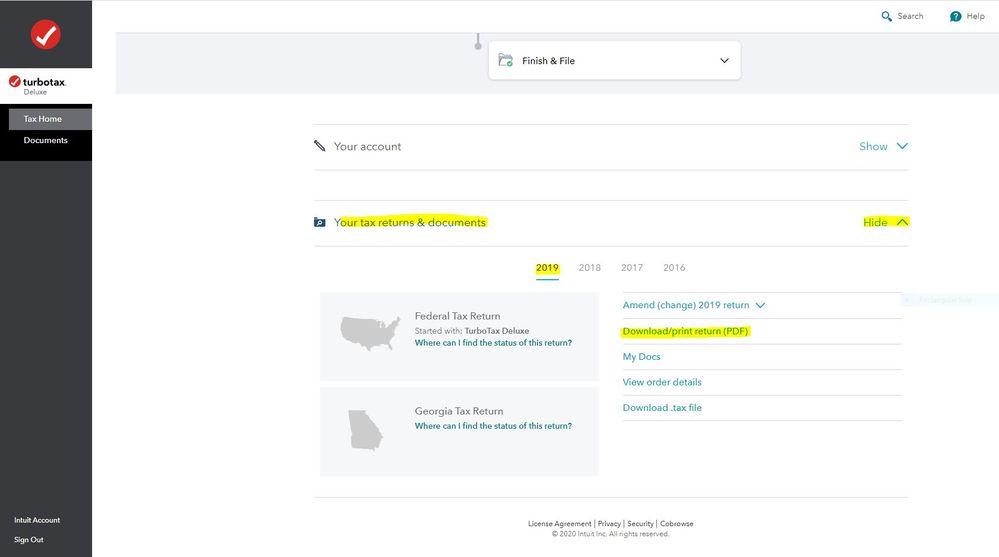
Scroll down to the bottom of the screen and on the section Your tax returns & documents click on Show. Click on the Year and Click on Download/print return (PDF)
If you used the desktop CD/Download editions installed on your computer, the only copy of your tax data file and any PDF's will be on the computer where the return was created. TurboTax does not store online any returns completed using the desktop editions.
Or go to this IRS website for free federal tax return transcripts - https://www.irs.gov/individuals/get-transcript
For a fee of $50 you can get a complete federal tax return from the IRS by completing Form 4506 - http://www.irs.gov/pub/irs-pdf/f4506.pdf
December 12, 2020
9:37 AM
- Mark as New
- Bookmark
- Subscribe
- Subscribe to RSS Feed
- Permalink
- Report Inappropriate Content
How do I download last year's tax returns??? The stupid home page takes me to file this year's return, and their is no Document button on the left.
Do you have multiple User ID's?
Close all TurboTax windows on your web browser (including this one). Copy and paste the account recovery website link onto a new web browser window and run the tool.
Use this TurboTax account recovery website to get a list of all the User ID's for an email address. Run the tool against any email addresses you may have used - https://myturbotax.intuit.com/account-recovery
If none of the user ID's received will access your 2019 account, then use the option shown in blue on the account recovery website, "Try something else"
December 12, 2020
9:39 AM
- Mark as New
- Bookmark
- Subscribe
- Subscribe to RSS Feed
- Permalink
- Report Inappropriate Content
How do I download last year's tax returns??? The stupid home page takes me to file this year's return, and their is no Document button on the left.
doesn't work.
the https://myturbotax.intuit.com/ tak me to file 202 return and their is only only one button on the left menu, "SIgn Out".
December 12, 2020
9:40 AM
- Mark as New
- Bookmark
- Subscribe
- Subscribe to RSS Feed
- Permalink
- Report Inappropriate Content
How do I download last year's tax returns??? The stupid home page takes me to file this year's return, and their is no Document button on the left.
@mahal1122 wrote:
doesn't work.
the https://myturbotax.intuit.com/ tak me to file 202 return and their is only only one button on the left menu, "SIgn Out".
You do not see this on the TurboTax Home page when you sign onto your TurboTax account with the User ID you used to complete and file the 2019 tax return?
You may have to start a 2020 tax return before the links on the Tax Home web page become available. In that case start the 2020 tax return with the User ID you used for the 2019 return. Once some basic information has been transferred over, Tax Home should be visible on the left column. Click on Tax Home and then the other links will be shown as in this screenshot.
December 12, 2020
9:59 AM
- Mark as New
- Bookmark
- Subscribe
- Subscribe to RSS Feed
- Permalink
- Report Inappropriate Content
How do I download last year's tax returns??? The stupid home page takes me to file this year's return, and their is no Document button on the left.
When I login, this is all I see:

December 14, 2020
4:17 AM
- Mark as New
- Bookmark
- Subscribe
- Subscribe to RSS Feed
- Permalink
- Report Inappropriate Content
How do I download last year's tax returns??? The stupid home page takes me to file this year's return, and their is no Document button on the left.
@mahal1122 As I said you may have to start a 2020 tax return with some basic information before the links on the left hand column become available. Once those links are available click on Tax Home and follow the procedure to download the prior year tax returns.
December 14, 2020
6:11 AM

- Mark as New
- Bookmark
- Subscribe
- Subscribe to RSS Feed
- Permalink
- Report Inappropriate Content
How do I download last year's tax returns??? The stupid home page takes me to file this year's return, and their is no Document button on the left.
My home page also does not have the "Documents" tab on the left hand side. I am guessing it is because I have the live option which includes an Expert. It is frustrating that I cannot access my 2019 tax documents myself as I need them for a time-sensitive application.
March 19, 2021
1:00 PM


- Mark as New
- Bookmark
- Subscribe
- Subscribe to RSS Feed
- Permalink
- Report Inappropriate Content
How do I download last year's tax returns??? The stupid home page takes me to file this year's return, and their is no Document button on the left.
If you are having issues and need assistance, please contact customer support. Please see the Customer Support phone number here. If you would like to reach out through our website, please see the TurboTax FAQ below for contact information: https://support.turbotax.intuit.com/contact/
**Say "Thanks" by clicking the thumb icon in a post
**Mark the post that answers your question by clicking on "Mark as Best Answer"
**Mark the post that answers your question by clicking on "Mark as Best Answer"
March 19, 2021
2:19 PM
- Mark as New
- Bookmark
- Subscribe
- Subscribe to RSS Feed
- Permalink
- Report Inappropriate Content
How do I download last year's tax returns??? The stupid home page takes me to file this year's return, and their is no Document button on the left.
My Tax Expert sent me steps on how to find it. I had to use the mobile app to access the tax documents. Would be helpful if that information was included in the Turbo Tax help!
I did contact customer service, went through the automated prompts which only texted me the same original guidance that I found online. It was not helpful.
I hope that sharing the solution (using the mobile app) helps someone else in the future.
March 19, 2021
2:36 PM
Still have questions?
Questions are answered within a few hours on average.
Post a Question*Must create login to post


Unlock tailored help options in your account.


Get more help
Ask questions and learn more about your taxes and finances.
Related Content

williamhein
New Member

Ed_K
New Member

wordsforsale
Returning Member
hyybid
Level 2
krishughes2
New Member